# Better way to populate the Bootstrap Carousel
**URL:** https://forum.bootstrapstudio.io/t/better-way-to-populate-the-bootstrap-carousel/6060
**Category:** Ideas
**Created:** [July 25, 2020, 2:01pm UTC](https://forum.bootstrapstudio.io/t/better-way-to-populate-the-bootstrap-carousel/6060 "2020-07-25T14:01:14Z")
**Posts on this page:** 7
**Page:** 1
### Author:  [@printninja](https://forum.bootstrapstudio.io/u/printninja)
#### Post date: [July 25, 2020, 2:01pm UTC](https://forum.bootstrapstudio.io/t/better-way-to-populate-the-bootstrap-carousel/6060/1 "2020-07-25T14:01:14Z")
Right now, to add a pic to a carousel, you have move to the desired slide and click on the image (or do the same in the Overview), and then change the image, one slide at a time. This is very tedious on large carousels. I'd like to see a feature where you input the number of slides you want in the carousel, and then you can populate them all at once through a menu. Or at the very least, make it similar to how you can select video sources for HTML5 videos.
---
### Author:  [@printninja](https://forum.bootstrapstudio.io/u/printninja)
#### Post date: [October 3, 2020, 2:37am UTC](https://forum.bootstrapstudio.io/t/better-way-to-populate-the-bootstrap-carousel/6060/2 "2020-10-03T02:37:20Z")
Since this post never got any traction, I'm giving it a bump and further adding my vision of how to improve the population of the Bootstrap carousel with the below image. 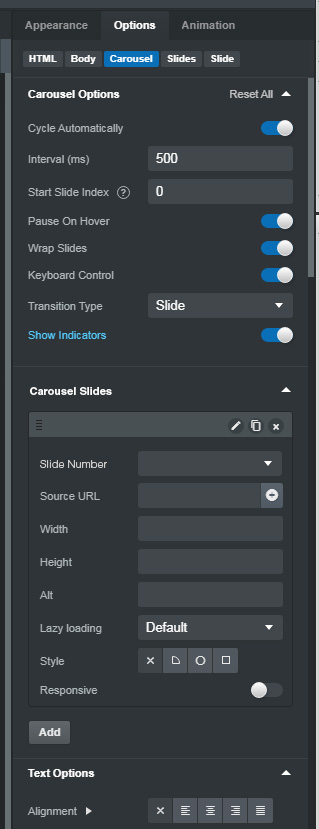
---
### Author:  [@jo-r](https://forum.bootstrapstudio.io/u/jo-r)
#### Post date: [October 3, 2020, 3:21am UTC](https://forum.bootstrapstudio.io/t/better-way-to-populate-the-bootstrap-carousel/6060/3 "2020-10-03T03:21:30Z")
+1 Oh I like that idea a lot. I must have totally missed this post the originally.
---
### Author:  [@printninja](https://forum.bootstrapstudio.io/u/printninja)
#### Post date: [October 3, 2020, 4:31am UTC](https://forum.bootstrapstudio.io/t/better-way-to-populate-the-bootstrap-carousel/6060/4 "2020-10-03T04:31:48Z")
Hope the devs see it.
@Martin
(I wish it actually notified people when you did the whole "@name" thing)
---
### Author:  [@martin](https://forum.bootstrapstudio.io/u/martin)
#### Post date: [October 7, 2020, 3:04pm UTC](https://forum.bootstrapstudio.io/t/better-way-to-populate-the-bootstrap-carousel/6060/5 "2020-10-07T15:04:08Z")
It's a little known feature, but you can double click an image in a slide from the Overview panel, and the application will switch to it and let you change it directly. The same goes for captions and other text elements that you might have in a slide.
The UI we show for video and audio sources is possible because they aren't real components. Once a element on the page is a real component it can only be managed by drag/drop and the other visual tools, it can't be managed by another component's options.
---
### Author:  [@printninja](https://forum.bootstrapstudio.io/u/printninja)
#### Post date: [October 8, 2020, 5:38am UTC](https://forum.bootstrapstudio.io/t/better-way-to-populate-the-bootstrap-carousel/6060/6 "2020-10-08T05:38:26Z")
I was aware of the "double-click in overview" ability. I was just looking for a faster way to populate a carousel, rather than having to add slides, click each slide, then choose a pic.
For example, if you could drop a Carousel on the page and then just multi-select 20 images from the design pane and drop them onto the slider, and **bang,** all your slides are in place and ready to add alt tags to. I realize it's not a strictly "Bootstrap" sort of workflow, but it would be a unique feature if BSS could do something like this.
---
### Author:  [@jo-r](https://forum.bootstrapstudio.io/u/jo-r)
#### Post date: [October 8, 2020, 6:24am UTC](https://forum.bootstrapstudio.io/t/better-way-to-populate-the-bootstrap-carousel/6060/7 "2020-10-08T06:24:06Z")
+1 I too would love this to happen. That would allow me to get off some of the external slider/carousel apps I use. Right now the app I use is a drag and drop all your images into the app window, then hit a v or ^ to move them up or down to rearrange them. Much simpler than adding them one by one in BSS for sure. Yes it's custom code, but I used it before BSS so I'm very familiar with what to change in the files when needed. I'd definitely give that up to be able to more easily populate them in BSS components.