# How do I embed a YouTube video from a specific time?
**URL:** https://forum.bootstrapstudio.io/t/how-do-i-embed-a-youtube-video-from-a-specific-time/7244
**Category:** Bootstrap Studio Help
**Created:** [April 19, 2021, 3:46pm UTC](https://forum.bootstrapstudio.io/t/how-do-i-embed-a-youtube-video-from-a-specific-time/7244 "2021-04-19T15:46:54Z")
**Posts on this page:** 19
**Page:** 1
### Author:  [@Bogdan](https://forum.bootstrapstudio.io/u/Bogdan)
#### Post date: [April 19, 2021, 3:46pm UTC](https://forum.bootstrapstudio.io/t/how-do-i-embed-a-youtube-video-from-a-specific-time/7244/1 "2021-04-19T15:46:54Z")
Friends, hi! Please help me.
It’s fundamentally important for me to put videos on the page that start with the time I want.
I’m talking about links like this: [- YouTube](https://www.youtube.com/watch?v=*********)**&t=12s**
For example, I only need to show one phrase from a two-hour interview. Or I need to post the video already after the intro. And so on.
I’ve put these kinds of links in the primitive page builder on Wordpress before, and everything worked fine.
But in BBS these links don’t work: in option’s panel I put the link with time, but in fact the video starts from the beginning ☹
How can I make links work together with time?
---
### Author:  [@kuligaposten](https://forum.bootstrapstudio.io/u/kuligaposten)
#### Post date: [April 19, 2021, 4:49pm UTC](https://forum.bootstrapstudio.io/t/how-do-i-embed-a-youtube-video-from-a-specific-time/7244/2 "2021-04-19T16:49:01Z")
If you use the responsive embed like this
`https://www.youtube.com/embed/9FvvbVI5rYA?start=12`
the number after start is in seconds
---
### Author:  [@Bogdan](https://forum.bootstrapstudio.io/u/Bogdan)
#### Post date: [April 19, 2021, 5:02pm UTC](https://forum.bootstrapstudio.io/t/how-do-i-embed-a-youtube-video-from-a-specific-time/7244/4 "2021-04-19T17:02:22Z")
That is, the native functionality of the BSS does not imply this (through the “option’s panel”)? Do I have to use “custom code”?
---
### Author:  [@kuligaposten](https://forum.bootstrapstudio.io/u/kuligaposten)
#### Post date: [April 19, 2021, 5:13pm UTC](https://forum.bootstrapstudio.io/t/how-do-i-embed-a-youtube-video-from-a-specific-time/7244/5 "2021-04-19T17:13:25Z")
No custom code just add the link in the options panel
---
### Author:  [@kuligaposten](https://forum.bootstrapstudio.io/u/kuligaposten)
#### Post date: [April 19, 2021, 5:23pm UTC](https://forum.bootstrapstudio.io/t/how-do-i-embed-a-youtube-video-from-a-specific-time/7244/6 "2021-04-19T17:23:46Z")
You have to use the responsive embed, with the video component BSS cut the link after the question mark
---
### Author:  [@Bogdan](https://forum.bootstrapstudio.io/u/Bogdan)
#### Post date: [April 19, 2021, 5:41pm UTC](https://forum.bootstrapstudio.io/t/how-do-i-embed-a-youtube-video-from-a-specific-time/7244/7 "2021-04-19T17:41:17Z")
[kuligaposten](https://forum.bootstrapstudio.io/u/kuligaposten), thanks, it seems to be working. If you’re so advanced, maybe you know how I can add other parameters besides start-time? I mean such as: not only the start, but the end ("&start=111&end=168"), autoplay=1, frameborder=0, not show recommended videos and so on?
---
### Author:  [@kuligaposten](https://forum.bootstrapstudio.io/u/kuligaposten)
#### Post date: [April 19, 2021, 8:21pm UTC](https://forum.bootstrapstudio.io/t/how-do-i-embed-a-youtube-video-from-a-specific-time/7244/8 "2021-04-19T20:21:38Z")
You have to do that with javascript and the YouTube api, because BSS change all & to `&` on your links and YouTube don’t accept that.
> **[YouTube Player API Reference for iframe Embeds](https://developers.google.com/youtube/iframe_api_reference)**
>
> Embed a YouTube player in your application.
or edit your exported HTML and delete the amp; after the &
---
### Author:  [@Bogdan](https://forum.bootstrapstudio.io/u/Bogdan)
#### Post date: [April 20, 2021, 2:32pm UTC](https://forum.bootstrapstudio.io/t/how-do-i-embed-a-youtube-video-from-a-specific-time/7244/9 "2021-04-20T14:32:07Z")
I clarified in support. They said that all YouTube link parameters can only be applied through the “Custom code component”.
[kuligaposten](https://forum.bootstrapstudio.io/u/kuligaposten), I need to put several dozen video testimonials on the page. If I just insert the code, it will slow down the loading of the page a lot. There will be a lot of simultaneous requests to YouTube server.
On Wordpress I used modal window plugins like “prettyphoto” and similar. There was only a picture on the page, the visitor clicked on it and already in the modal window started autoloading the video. It seems that until you click, there was no request to YouTube server.
I see that the BSS has a “Modal” component. But that’s how to adapt “Custom Code” with YouTube link I can’t figure out.
Can you tell me?
---
### Author:  [@kuligaposten](https://forum.bootstrapstudio.io/u/kuligaposten)
#### Post date: [April 20, 2021, 6:35pm UTC](https://forum.bootstrapstudio.io/t/how-do-i-embed-a-youtube-video-from-a-specific-time/7244/10 "2021-04-20T18:35:24Z")
You don’t need custom code.
I skipped the modal thing and made a Testimonial slider instead. No video is loaded until you click a button in this case.Take a look at the link above. I use one Responsive embed for all videos
This in the markup for the trigger can be anything you like in this case a Button
If you want to play the whole video set data-bs-start and data-bs-end to 0

this is the markup for the responsive embed
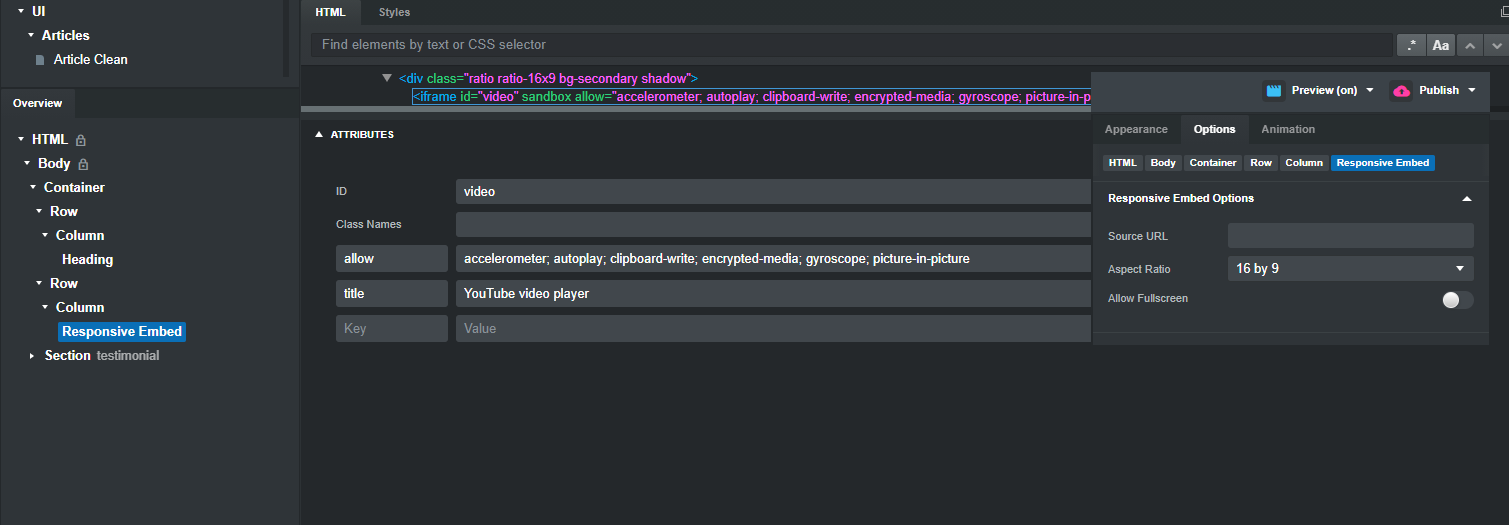
and this is the javascript
```auto
var video = document.getElementById('video')
if(video){
var start = v.getAttribute('data-bs-start')
var end = v.getAttribute('data-bs-end')
var videoSrc = v.getAttribute('data-bs-video')
var playThis = 'https://www.youtube.com/embed/' + videoSrc + '?autoplay=1&start='+start+'&end='+end+'&controls=0&playlist=0&loop=1&rel=0'
video.src = playThis
var length = (end - start) * 1000
setTimeout(function(){
video.src = ''}, length)
}
}
```
If you want the controls in the video set controls=1
the &playlist=0 and &loop=1 makes you have no recommended videos when the video ends
This is for Bootstrap 5 and no jQuery is needed
Let me know if you want a link to the example bs.design
---
### Author:  [@Bogdan](https://forum.bootstrapstudio.io/u/Bogdan)
#### Post date: [April 20, 2021, 7:48pm UTC](https://forum.bootstrapstudio.io/t/how-do-i-embed-a-youtube-video-from-a-specific-time/7244/11 "2021-04-20T19:48:26Z")
Would you mind providing a link to the live web page to see how it looks in reality?
I really wish there was no slider. I’d like the page to have a long canvas of YouTube reviews — each one individually.
And not a button, but a picture. The visitor clicks on the picture and the video launches.
Do you think this is possible in BSS?
---
### Author:  [@printninja](https://forum.bootstrapstudio.io/u/printninja)
#### Post date: [April 21, 2021, 3:21am UTC](https://forum.bootstrapstudio.io/t/how-do-i-embed-a-youtube-video-from-a-specific-time/7244/13 "2021-04-21T03:21:52Z")
This might be of help to you…
> **[paulirish/lite-youtube-embed](https://github.com/paulirish/lite-youtube-embed)**
>
> A faster youtube embed. Contribute to paulirish/lite-youtube-embed development by creating an account on GitHub.
I’ve also uploaded a component to the online BSS library called **Youtube Video Lazyload 2020** which you can see in action on this page…
[https://karatelehighvalley.com/aikido-masters-video-gallery.html](https://karatelehighvalley.com/aikido-masters-video-gallery.html)
34 videos and the page loads instantly. It scores a respectable 74 mobile / 92 desktop on Google Page Speed Insights.
---
### Author:  [@Bogdan](https://forum.bootstrapstudio.io/u/Bogdan)
#### Post date: [April 21, 2021, 6:13am UTC](https://forum.bootstrapstudio.io/t/how-do-i-embed-a-youtube-video-from-a-specific-time/7244/14 "2021-04-21T06:13:49Z")
[kuligaposten](https://forum.bootstrapstudio.io/u/kuligaposten), thanks a lot 🙏
I’m going to try it. And I’ll pray that the user has javascripts turned on in the browser 😉
What version of BSS do you have? I have the latest one, but I don’t see that many fields in the attributes:

And what such a button in the component browser to choose, where there will be so many additional fields: data-bs-video, data-bs-start, data-bs-end, onclick, etc.?
---
### Author:  [@Bogdan](https://forum.bootstrapstudio.io/u/Bogdan)
#### Post date: [April 21, 2021, 6:25am UTC](https://forum.bootstrapstudio.io/t/how-do-i-embed-a-youtube-video-from-a-specific-time/7244/15 "2021-04-21T06:25:39Z")
[printninja](https://forum.bootstrapstudio.io/u/printninja), your “Youtube Video Lazyload 2020” was the first thing I looked at before writing here. That’s a cool idea!
But, unfortunately, I didn’t to add additional video options (start and end time, autoplay, don’t show recommended videos, etc.).
Whatever I specified in the «data-id="\_\_\_"» field of your custom code — only the video address works 😢
---
### Author:  [@twinstream](https://forum.bootstrapstudio.io/u/twinstream)
#### Post date: [April 21, 2021, 2:18pm UTC](https://forum.bootstrapstudio.io/t/how-do-i-embed-a-youtube-video-from-a-specific-time/7244/16 "2021-04-21T14:18:08Z")
> [@kuligaposten](#):
>
> If you don’t want a slider you don’t have a slider on your page
> if you don’t want a button as trigger then don’t have a button as trigger
> if you want a picture as trigger add the markup you can see one post above to your picture
>
> **Yes** it is possible in BSS
Thats pretty cool kuligaposten !
---
### Author:  [@printninja](https://forum.bootstrapstudio.io/u/printninja)
#### Post date: [April 22, 2021, 5:31am UTC](https://forum.bootstrapstudio.io/t/how-do-i-embed-a-youtube-video-from-a-specific-time/7244/17 "2021-04-22T05:31:09Z")
Sorry, it’s something I cobbled together from a script I found online years ago to solve a specific problem for the client. I’m not a javascript programmer, so I wouldn’t know how to modify it to make it work with your time-based requirements. But if anyone can figure it out, it would be @kuligaposten
---
### Author:  [@Bogdan](https://forum.bootstrapstudio.io/u/Bogdan)
#### Post date: [May 6, 2021, 9:41pm UTC](https://forum.bootstrapstudio.io/t/how-do-i-embed-a-youtube-video-from-a-specific-time/7244/19 "2021-05-06T21:41:47Z")
> [@kuligaposten](#):
>
> I understand you think it is difficult, you can download the bsdesign here
Dear [kuligaposten](https://forum.bootstrapstudio.io/u/kuligaposten), unfortunately, the link does not work. I can’t download it 😢
---
### Author:  [@Bogdan](https://forum.bootstrapstudio.io/u/Bogdan)
#### Post date: [July 22, 2021, 8:02pm UTC](https://forum.bootstrapstudio.io/t/how-do-i-embed-a-youtube-video-from-a-specific-time/7244/21 "2021-07-22T20:02:32Z")
Friends, save me!
YouTube changed something, and now our code doesn’t work ☹
Now visitors go to my site and see “This video is unavailable”.
What to do now?
@kuligaposten, if you click on any of the videos in your example above, you’ll understand my misfortune: [YouTube Player](https://kuligaposten.com/video/)
---
### Author:  [@printninja](https://forum.bootstrapstudio.io/u/printninja)
#### Post date: [July 24, 2021, 5:31am UTC](https://forum.bootstrapstudio.io/t/how-do-i-embed-a-youtube-video-from-a-specific-time/7244/22 "2021-07-24T05:31:06Z")
Link to your website?
---
### Author:  [@Bogdan](https://forum.bootstrapstudio.io/u/Bogdan)
#### Post date: [July 24, 2021, 8:10am UTC](https://forum.bootstrapstudio.io/t/how-do-i-embed-a-youtube-video-from-a-specific-time/7244/23 "2021-07-24T08:10:58Z")
Thank you for your concern. @kuligaposten got it all figured out. Turns out YouTube changed the code for specifying playlists all of a sudden.