# Version 6.0.0 is out!
**URL:** https://forum.bootstrapstudio.io/t/version-6-0-0-is-out/8665
**Category:** Announcements
**Created:** [April 12, 2022, 9:01am UTC](https://forum.bootstrapstudio.io/t/version-6-0-0-is-out/8665 "2022-04-12T09:01:39Z")
**Posts on this page:** 20
**Page:** 1
### Author:  [@gabby](https://forum.bootstrapstudio.io/u/gabby)
#### Post date: [April 12, 2022, 9:01am UTC](https://forum.bootstrapstudio.io/t/version-6-0-0-is-out/8665/1 "2022-04-12T09:01:39Z")
Hey guys! I’m happy to announce that we’ve just released v6.0! It comes with quite a few additions that we’d love to hear your opinion about. Here’s what’s new:
**New**
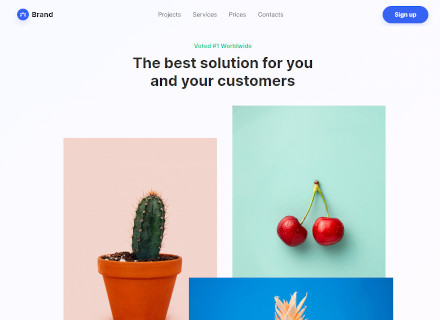
- A new template was added, called “Bold & Bright”. It consists of multiple pages, parallax effects, customizable widgets and ecommerce integration.
- The UI components built into the app were modernized and expanded. They adapt to the Bootstrap theme that you use and look great on every screen size.
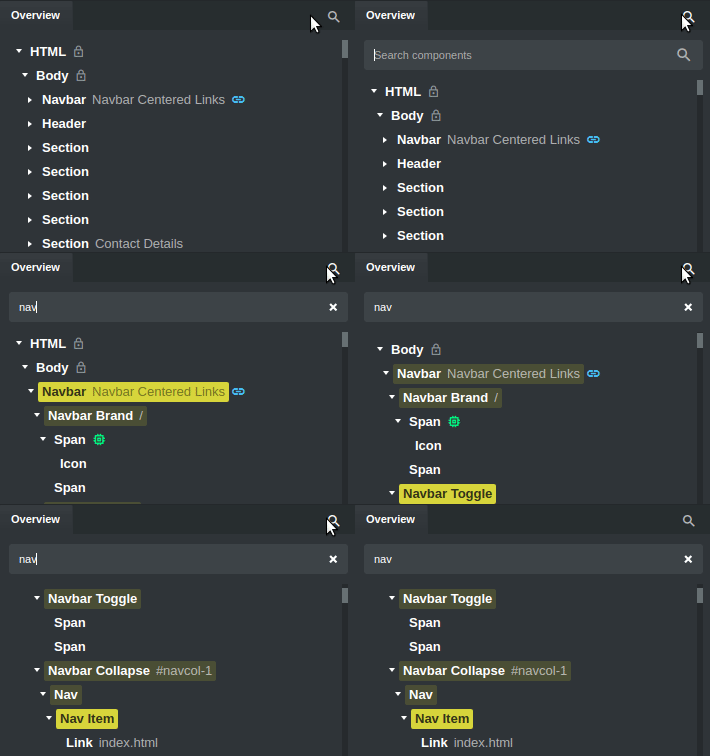
- You can now search in all panels in the app. This makes it easy to find files, settings and components.
- A new Download Google Fonts export setting was added. With it the app can automatically download fonts as local files, improving performance and privacy.
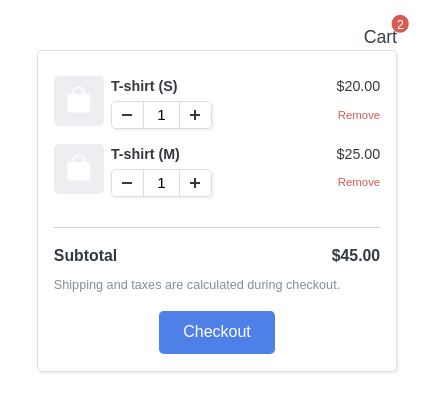
- A View Cart ecommerce component was added, powered by Reflow.
**Improved**
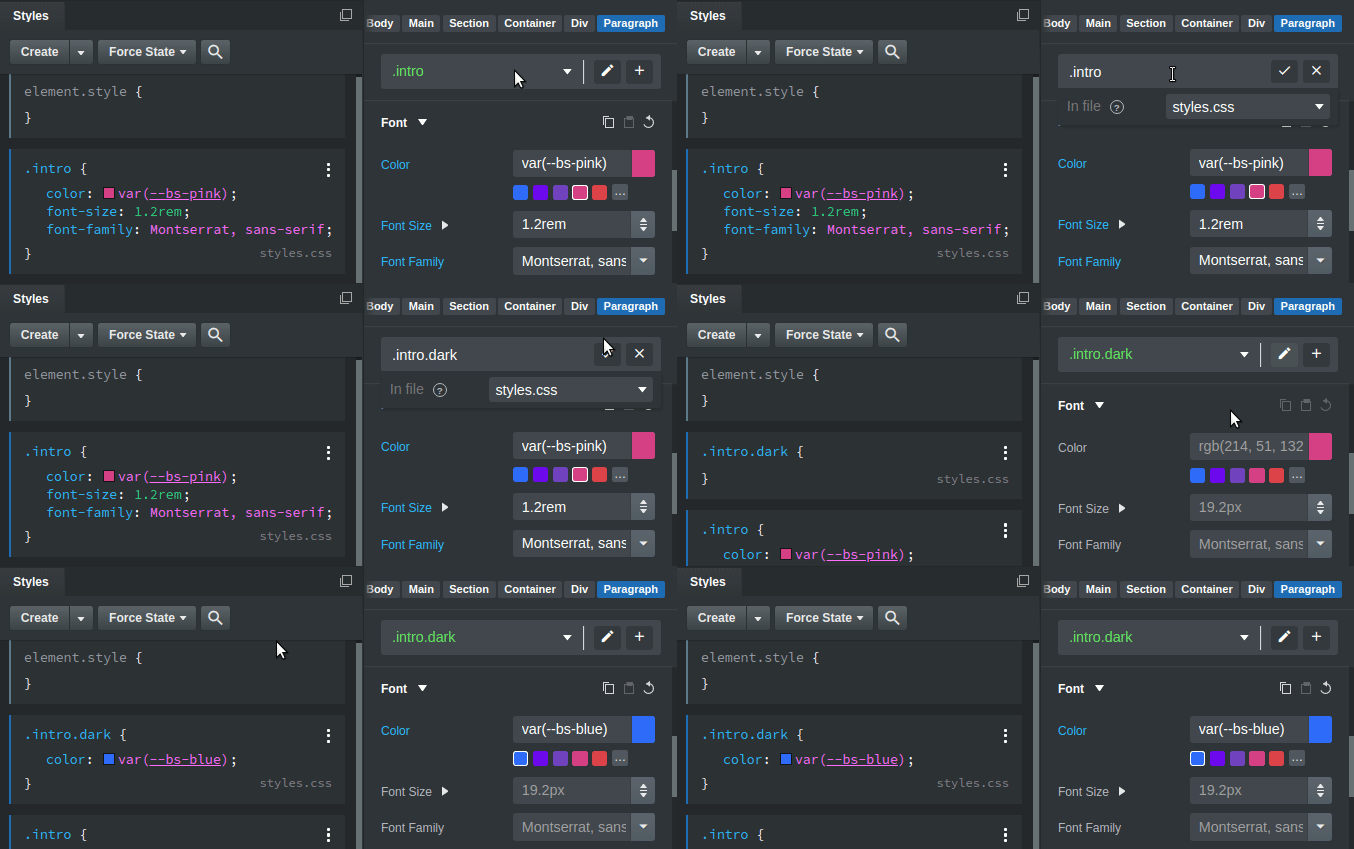
- The Style Target dropdown in the Appearance panel was revamped. It can now create and edit class names and ids, making it quicker to style elements. Learn more about it [here](https://bootstrapstudio.io/docs/options-panel.html#style-target-editor).
- When publishing to SFTP servers, you can now use the Custom Publish option to review which files will be uploaded.
- The Carousel component has a new option for showing and hiding the control arrows.
- The Preview settings panel now shows QR codes for quickly connecting with your phone.
**Fixed**
- A multitude of bugfixes and optimizations.
---
### Author:  [@dickykreedz](https://forum.bootstrapstudio.io/u/dickykreedz)
#### Post date: [April 12, 2022, 9:07am UTC](https://forum.bootstrapstudio.io/t/version-6-0-0-is-out/8665/2 "2022-04-12T09:07:13Z")
Finally Announcement 😃
---
### Author:  [@floydmanfloyd](https://forum.bootstrapstudio.io/u/floydmanfloyd)
#### Post date: [April 11, 2022, 7:32pm UTC](https://forum.bootstrapstudio.io/t/version-6-0-0-is-out/8665/3 "2022-04-11T19:32:57Z")
Update out to BS6. I must say our developers are great. Love the updates. Thanks team. 😀
---
### Author:  [@richards](https://forum.bootstrapstudio.io/u/richards)
#### Post date: [April 11, 2022, 7:39pm UTC](https://forum.bootstrapstudio.io/t/version-6-0-0-is-out/8665/4 "2022-04-11T19:39:14Z")
I spent the last 30 minutes not updating until I had finished the project I was working on, the updates look great.
---
### Author:  [@apowell656](https://forum.bootstrapstudio.io/u/apowell656)
#### Post date: [April 11, 2022, 9:37pm UTC](https://forum.bootstrapstudio.io/t/version-6-0-0-is-out/8665/5 "2022-04-11T21:37:56Z")
Another brilliant update.
---
### Author:  [@dickykreedz](https://forum.bootstrapstudio.io/u/dickykreedz)
#### Post date: [April 11, 2022, 10:20pm UTC](https://forum.bootstrapstudio.io/t/version-6-0-0-is-out/8665/6 "2022-04-11T22:20:34Z")
Fax guys this is one of best ones
---
### Author:  [@jo-r](https://forum.bootstrapstudio.io/u/jo-r)
#### Post date: [April 11, 2022, 10:24pm UTC](https://forum.bootstrapstudio.io/t/version-6-0-0-is-out/8665/7 "2022-04-11T22:24:16Z")
Awesome update guys, so many new things I love it!
P.S. I checked out the new theme and none of the product stuff is there, just blank template pages, no content
---
### Author:  [@martin](https://forum.bootstrapstudio.io/u/martin)
#### Post date: [April 12, 2022, 11:07am UTC](https://forum.bootstrapstudio.io/t/version-6-0-0-is-out/8665/8 "2022-04-12T11:07:42Z")
Thank you for the feedback!
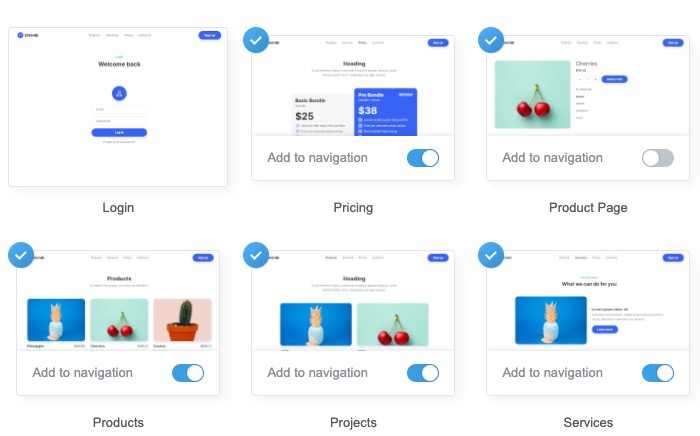
@jo-r We can’t seem to reproduce the issue. To be clear, in the New Design dialog you choose the _Bold and Bright_ template, click Customize and enable the “Products” and “Product Page” pages, create the design, and the pages are blank?
_ **Note** _ I moved the posts from the earlier thread by @floydmanfloyd here so that the discussion lives in a single place.
---
### Author:  [@jo-r](https://forum.bootstrapstudio.io/u/jo-r)
#### Post date: [April 12, 2022, 12:23pm UTC](https://forum.bootstrapstudio.io/t/version-6-0-0-is-out/8665/9 "2022-04-12T12:23:53Z")
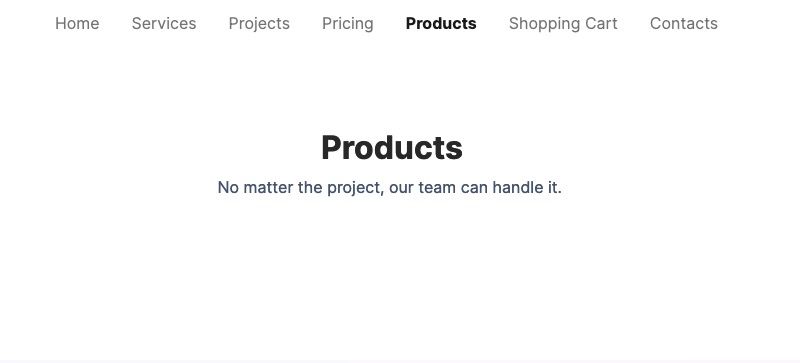
Yah that’s what I’m doing (Mac version). Here’s a couple screenshots of what I see when I have them selected. I didn’t add the Product Page to the Nav since you normally wouldn’t, but even if I do I see the same empty content as below.
---
### Author:  [@martin](https://forum.bootstrapstudio.io/u/martin)
#### Post date: [April 12, 2022, 12:28pm UTC](https://forum.bootstrapstudio.io/t/version-6-0-0-is-out/8665/10 "2022-04-12T12:28:31Z")
Is the second screenshot made in Bootstrap Studio or in the browser? Like all other Ecommerce components, you will need to connect to a Reflow store to see products when previewing and exporting. In the app itself we show mock data if no Reflow stores are connected.
---
### Author:  [@jo-r](https://forum.bootstrapstudio.io/u/jo-r)
#### Post date: [April 12, 2022, 12:36pm UTC](https://forum.bootstrapstudio.io/t/version-6-0-0-is-out/8665/11 "2022-04-12T12:36:25Z")
In the browser (Firefox). In BSS there are products on the page and a product is also there in BSS if I open the product page, just nothing shows in the browser. Seems that it should if it’s on the page right?
I also cannot select any of the products on the Products page. Acts like an image, but if I click something in the HTML window it highlights the selected product momentarily in preview even though it’s selected in the HTML window.
I’m going to hazzard a guess that some of this is probably due to my not being familiar with how the Reflow and products etc. are done, but still seems like something “should” show up in the content if it’s in the BSS window.
---
### Author:  [@maclm](https://forum.bootstrapstudio.io/u/maclm)
#### Post date: [April 12, 2022, 12:38pm UTC](https://forum.bootstrapstudio.io/t/version-6-0-0-is-out/8665/12 "2022-04-12T12:38:37Z")
Hi folks!
Thanks and kudos for the update.
Are there any breaking changes from V5?
---
### Author:  [@richards](https://forum.bootstrapstudio.io/u/richards)
#### Post date: [April 12, 2022, 3:38pm UTC](https://forum.bootstrapstudio.io/t/version-6-0-0-is-out/8665/13 "2022-04-12T15:38:05Z")
It seems that it shows dummy products (in bss only) and doesn’t become active in the browser window until you connect your reflow store. When the store is connected it then gives the option for mock data, clicking this will show the dummy data in bss and the real products in the browser.
This is in any product list, not just in the new theme.
---
### Author:  [@jo-r](https://forum.bootstrapstudio.io/u/jo-r)
#### Post date: [April 12, 2022, 4:59pm UTC](https://forum.bootstrapstudio.io/t/version-6-0-0-is-out/8665/14 "2022-04-12T16:59:22Z")
Ahhh ty @richards that makes total sense and was kind of what I was thinking too, but wanted to be sure.
Suggestion/Idea: Can we possibly get a filter for the Custom Publish, or a way to separate the files by type or something? At first I thought they were in alpha order, but after checking more closely there’s assets at the top of the list and at the bottom so I guess it’s not alpha. Some time of filter with a drop-down to choose file types in would be an awesome addition to this feature I think. That would save us some time going up and down that list lol. Lovin’ it! 💓
---
### Author:  [@gabby](https://forum.bootstrapstudio.io/u/gabby)
#### Post date: [April 12, 2022, 5:08pm UTC](https://forum.bootstrapstudio.io/t/version-6-0-0-is-out/8665/15 "2022-04-12T17:08:42Z")
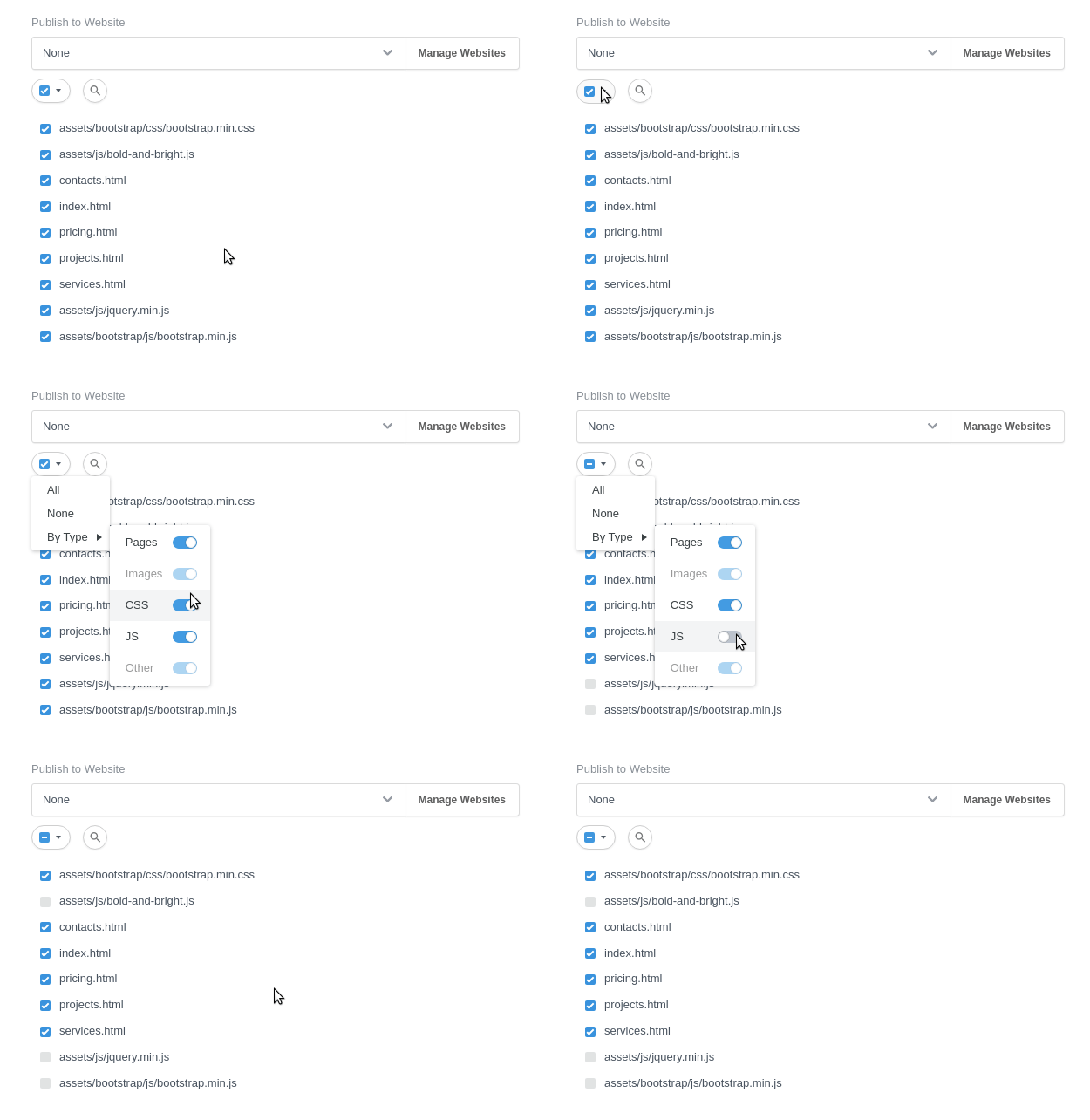
You can toggle the files in the Custom Publish dialog by type like this:
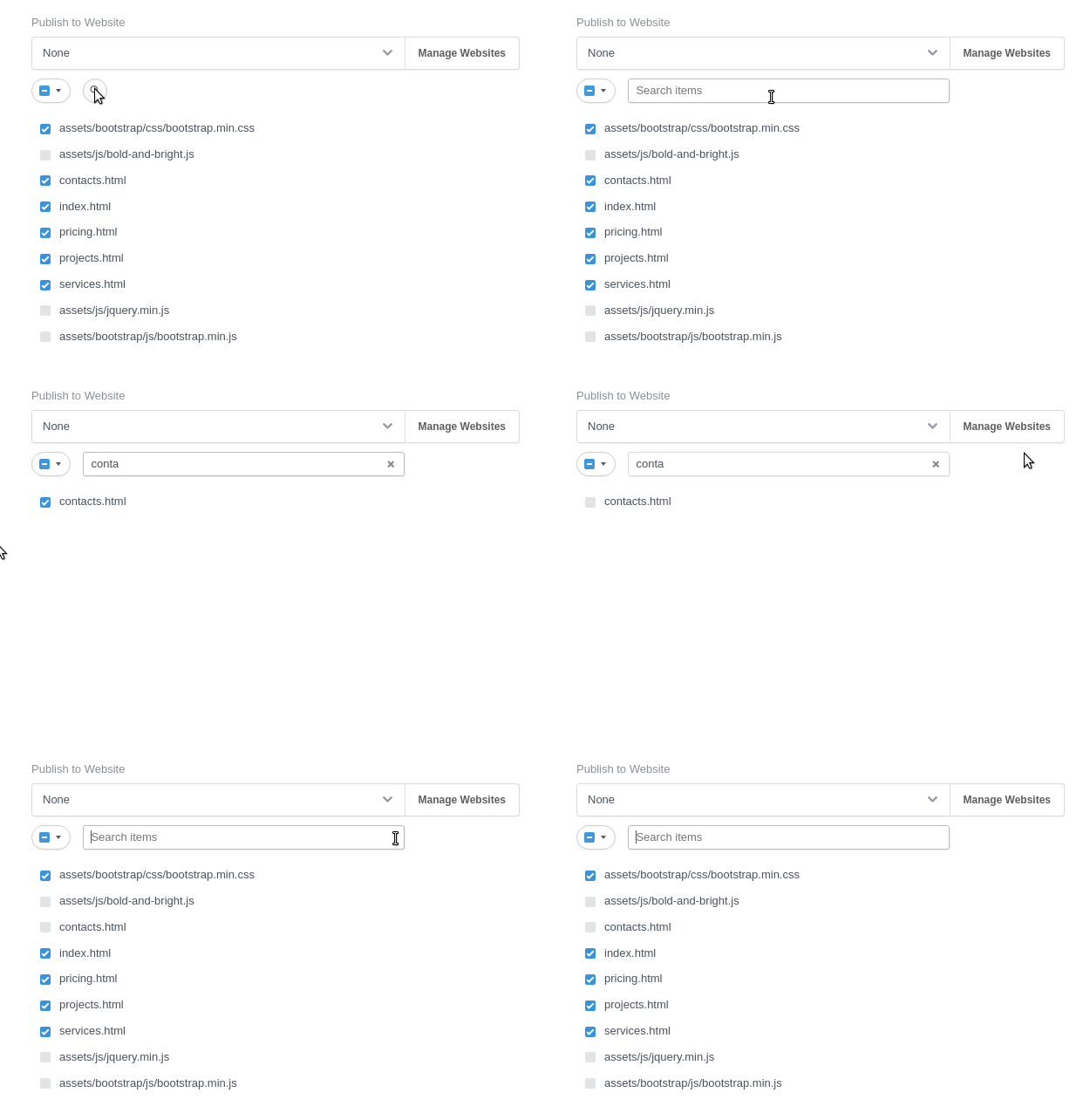
And you can also use the search to find specific files:
---
### Author:  [@jo-r](https://forum.bootstrapstudio.io/u/jo-r)
#### Post date: [April 12, 2022, 5:45pm UTC](https://forum.bootstrapstudio.io/t/version-6-0-0-is-out/8665/16 "2022-04-12T17:45:08Z")
Yeah , I guess the search function will work ok for this. Just seems that there should be some type of sorting setup to make it easier is all. The by Type won’t be helpful for me much as I don’t usually do all of a single type, just some or one. This means I still have to scale the whole list to find just the ones you want to check.
Otherwise, one of the nice things about the publishing is that it’s actually faster to upload the full site in BSS than it is in FileZilla. Go figure 😛
---
### Author:  [@jo-r](https://forum.bootstrapstudio.io/u/jo-r)
#### Post date: [April 14, 2022, 1:02pm UTC](https://forum.bootstrapstudio.io/t/version-6-0-0-is-out/8665/17 "2022-04-14T13:02:00Z")
Not sure if this was intentional, but the setting to make sass partials be invisible is gone. There’s no visibility or hide setting at all.
---
### Author:  [@karatrick](https://forum.bootstrapstudio.io/u/karatrick)
#### Post date: [April 19, 2022, 7:43am UTC](https://forum.bootstrapstudio.io/t/version-6-0-0-is-out/8665/18 "2022-04-19T07:43:35Z")
Amazing, I like the new Template “Bold & Bright” so much!
Is there any quicker way to transform it to dark mode? Or a faster way to switch the colors to suit dark mode for all the pages?
My apology I am a not very experienced, and thank you in advance!
---
### Author:  [@dickykreedz](https://forum.bootstrapstudio.io/u/dickykreedz)
#### Post date: [April 19, 2022, 11:49am UTC](https://forum.bootstrapstudio.io/t/version-6-0-0-is-out/8665/19 "2022-04-19T11:49:57Z")
Just change the theme colors.
---
### Author:  [@karatrick](https://forum.bootstrapstudio.io/u/karatrick)
#### Post date: [April 19, 2022, 12:15pm UTC](https://forum.bootstrapstudio.io/t/version-6-0-0-is-out/8665/20 "2022-04-19T12:15:33Z")
Could you please indicate exactly where do i go to change this? Thanks, I was only able to change the navbar but i did struggle for the rest.
[Next page](https://forum.bootstrapstudio.io/t/version-6-0-0-is-out/8665.md?page=2)