# Version 6.3.0 is out!
**URL:** https://forum.bootstrapstudio.io/t/version-6-3-0-is-out/9848
**Category:** Announcements
**Created:** [January 20, 2023, 1:22pm UTC](https://forum.bootstrapstudio.io/t/version-6-3-0-is-out/9848 "2023-01-20T13:22:35Z")
**Posts on this page:** 20
**Page:** 1
### Author:  [@gabby](https://forum.bootstrapstudio.io/u/gabby)
#### Post date: [January 20, 2023, 1:22pm UTC](https://forum.bootstrapstudio.io/t/version-6-3-0-is-out/9848/1 "2023-01-20T13:22:35Z")
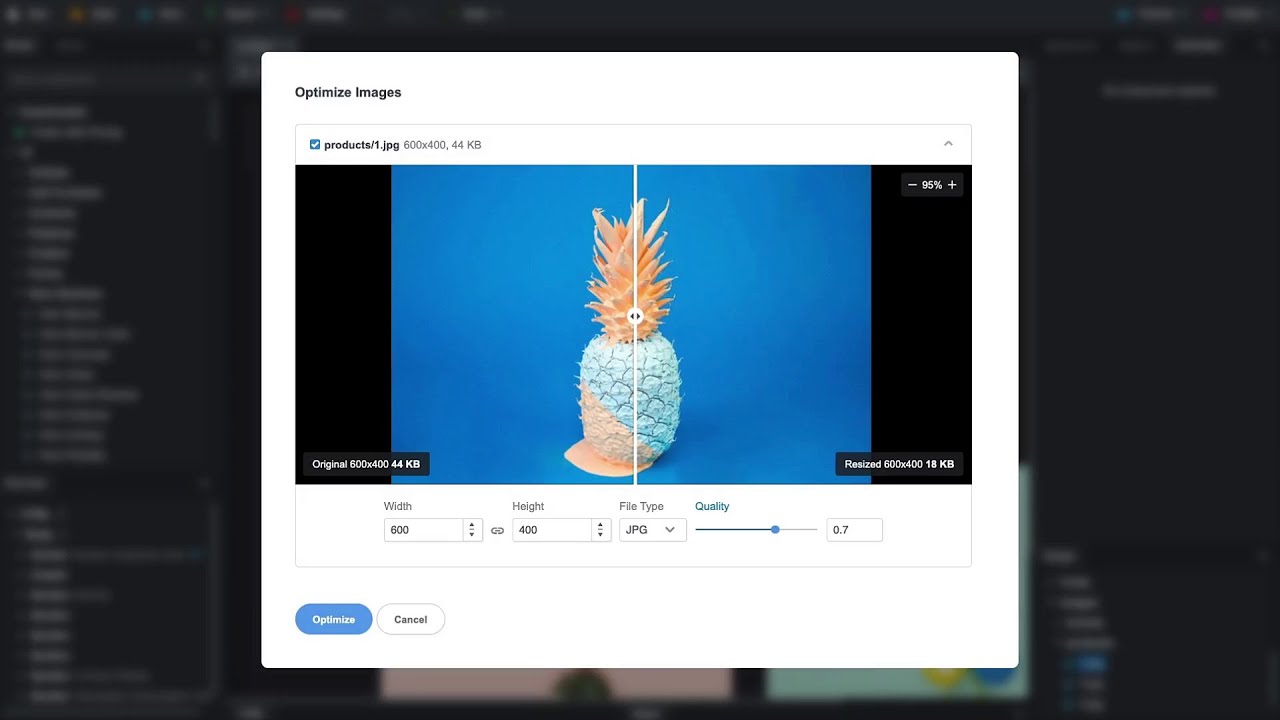
Hey guys! I’m happy to announce that we’ve just released v6.3.0! It comes with quite a few exciting additions. You can check out the highlights here:
[ ](https://www.youtube.com/watch?v=I40wkgqhb3A)
**New**
- You can now import entire websites and templates in the app. Just drag and drop one or more HTML files and choose to scan for assets.
- A new image optimization tool is available. Right click an image in the Design panel and choose “Optimize”. There you can resize, change the file type and compression with real time preview.
- App notifications can now be muted, and their position on screen can be changed.
**Improved**
- New audits related to SEO and performance were added to the Check for Issues tool.
- You can now copy/paste entire attributes in the attribute panel, and copy meta tags between pages.
- Icons in the Icon Dialog now load much faster.
- Pages can now be excluded from the Sitemap in the Page Properties dialog.
- Bootstrap was updated to version 5.2.3
- An Apple Silicon build is now available. Macs with M series chips will update automatically to it in our next release. If you don’t wish to wait, you can get it from our download page straight away.
**Fixed**
- A multitude of bugfixes and minor enhancements.
---
### Author:  [@clickryan](https://forum.bootstrapstudio.io/u/clickryan)
#### Post date: [January 20, 2023, 1:35pm UTC](https://forum.bootstrapstudio.io/t/version-6-3-0-is-out/9848/2 "2023-01-20T13:35:59Z")
Great update! Thank you ♥
---
### Author:  [@hackers\_84](https://forum.bootstrapstudio.io/u/hackers_84)
#### Post date: [January 20, 2023, 1:46pm UTC](https://forum.bootstrapstudio.io/t/version-6-3-0-is-out/9848/3 "2023-01-20T13:46:58Z")
Thanks BSS Devs - am looking forward to exploring all the updates. really digging the enhancements for image editing and Design checker tool.
---
### Author:  [@printninja](https://forum.bootstrapstudio.io/u/printninja)
#### Post date: [January 20, 2023, 1:54pm UTC](https://forum.bootstrapstudio.io/t/version-6-3-0-is-out/9848/4 "2023-01-20T13:54:46Z")
Looks awesome. Thanks for all the fixes!
---
### Author:  [@apowell656](https://forum.bootstrapstudio.io/u/apowell656)
#### Post date: [January 20, 2023, 1:57pm UTC](https://forum.bootstrapstudio.io/t/version-6-3-0-is-out/9848/5 "2023-01-20T13:57:44Z")
Amazing… that’s all!
---
### Author:  [@richards](https://forum.bootstrapstudio.io/u/richards)
#### Post date: [January 20, 2023, 4:32pm UTC](https://forum.bootstrapstudio.io/t/version-6-3-0-is-out/9848/6 "2023-01-20T16:32:50Z")
Looks fantastic, I’m very impressed with the image optimization tool, one request though, would it be possible to save the optimised image as a copy? This will be handy for creating fallbacks for webp images.
---
### Author:  [@jo-r](https://forum.bootstrapstudio.io/u/jo-r)
#### Post date: [January 20, 2023, 7:35pm UTC](https://forum.bootstrapstudio.io/t/version-6-3-0-is-out/9848/7 "2023-01-20T19:35:29Z")
Sounds awesome! I have M1 chip, but I have no idea where your downloads page is lol. Don’t think I’ve ever seen one.
---
### Author:  [@richards](https://forum.bootstrapstudio.io/u/richards)
#### Post date: [January 20, 2023, 7:48pm UTC](https://forum.bootstrapstudio.io/t/version-6-3-0-is-out/9848/8 "2023-01-20T19:48:58Z")
> **[Download Bootstrap Studio](https://bootstrapstudio.io/download)**
>
> Powerful Web Development Tool For The Bootstrap Framework.
---
### Author:  [@jo-r](https://forum.bootstrapstudio.io/u/jo-r)
#### Post date: [January 20, 2023, 9:01pm UTC](https://forum.bootstrapstudio.io/t/version-6-3-0-is-out/9848/9 "2023-01-20T21:01:44Z")
Ok color me blind, where do you find that @richards? I looked all around the site and didn’t find that lol.
---
### Author:  [@jo-r](https://forum.bootstrapstudio.io/u/jo-r)
#### Post date: [January 20, 2023, 9:22pm UTC](https://forum.bootstrapstudio.io/t/version-6-3-0-is-out/9848/10 "2023-01-20T21:22:02Z")
I have another question probably for @gabby
Is there a way to save the publishing sftp setups for my projects? If not, could this be something added to the todo list for those that will need to reinstall?
Also, do you know approx how long to the next update? If not long maybe I will wait so I don’t have to do all these little backups of the bstudio folder for the components and whatever else to save sftp connections for my projects etc.
---
### Author:  [@GregoryAM](https://forum.bootstrapstudio.io/u/GregoryAM)
#### Post date: [January 20, 2023, 11:35pm UTC](https://forum.bootstrapstudio.io/t/version-6-3-0-is-out/9848/11 "2023-01-20T23:35:31Z")
I’m ready to play around with the option to import entire websites!
I remember in September making a post about [Importing BSS Design files into Bootstrap Studio](https://forum.bootstrapstudio.io/t/import-other-bss-design-files-into-current-workspace/9336).
Now that it’s an option, this will completely change how I work on my current website!
Thank you, Bootstrap Studio Devs!
---
### Author:  [@printninja](https://forum.bootstrapstudio.io/u/printninja)
#### Post date: [January 21, 2023, 1:24am UTC](https://forum.bootstrapstudio.io/t/version-6-3-0-is-out/9848/12 "2023-01-21T01:24:36Z")
> [@jo-r](#):
>
> Ok color me blind, where do you find that @richards? I looked all around the site and didn’t find that lol.
The link to their download page is not shown anywhere on their website, or in the docs or the program. It would probably make sense for the devs (@martin) to add the link to their version repository somewhere in the program menu. The only place I’ve ever seen the link is in the email they send you with your license key when you purchase the program. A few people have asked this question in the Forum, and if you search the Forum for “Download Bootstrap Studio” you can find the posts with the link.
---
### Author:  [@Vk123](https://forum.bootstrapstudio.io/u/Vk123)
#### Post date: [January 21, 2023, 1:04pm UTC](https://forum.bootstrapstudio.io/t/version-6-3-0-is-out/9848/13 "2023-01-21T13:04:14Z")
I tried importing the same Arsha template a new folder and subfolder are created inside Styles and JavaScript which represent the path of files and folder where we import the template from its not being moved to Styles and JavaScript folder of bootstrap studio, please fix this issue Im using windows 10.
For example if the folder is inside G drive G/new folder/Arasha/assets/vendors/bootstrap/css/bootstrap.min.css
Bootstrap studio creates folder, subfolder and files in the above order instead of putting those scripts and stylesheets inside JavaScript and Styles folder
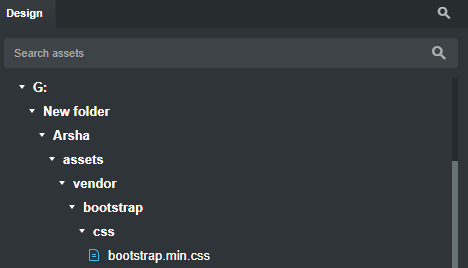
Please fix this import bug.
---
### Author:  [@martin](https://forum.bootstrapstudio.io/u/martin)
#### Post date: [January 21, 2023, 1:25pm UTC](https://forum.bootstrapstudio.io/t/version-6-3-0-is-out/9848/14 "2023-01-21T13:25:19Z")
@jo-r You don’t need to remove the bstudio folder in order to migrate to the Apple Silicon version. We will look into making an export for these settings in our next updates.
@Vk123 Thank you for the report! This issue seems to be is specific to Windows. Should be fixed next week.
---
### Author:  [@jo-r](https://forum.bootstrapstudio.io/u/jo-r)
#### Post date: [January 21, 2023, 7:40pm UTC](https://forum.bootstrapstudio.io/t/version-6-3-0-is-out/9848/15 "2023-01-21T19:40:29Z")
Thanks @Martin I’ve updated it to the silicon version and all seems to be intact and many things that weren’t working for me before are working now. I’ll browse it more tomorrow when I have more time. Thanks so much for doing this!
---
### Author:  [@johntankard](https://forum.bootstrapstudio.io/u/johntankard)
#### Post date: [January 23, 2023, 9:39pm UTC](https://forum.bootstrapstudio.io/t/version-6-3-0-is-out/9848/16 "2023-01-23T21:39:56Z")
The image Optimization update is superb! How you guys can compress the image so tightly and still retain superb resolution at vastly reduced file size is truly amazing. I absolutely love BSS. This now will save me hours in photoshop messing with each image… 👍
---
### Author:  [@larsene](https://forum.bootstrapstudio.io/u/larsene)
#### Post date: [January 27, 2023, 10:36am UTC](https://forum.bootstrapstudio.io/t/version-6-3-0-is-out/9848/17 "2023-01-27T10:36:39Z")
This version and the ability to import html files is incredible ! thanks so much for your work ! The image optimization is wonderful too !
Many Thanks !!
---
### Author:  [@greyscale](https://forum.bootstrapstudio.io/u/greyscale)
#### Post date: [January 29, 2023, 10:09pm UTC](https://forum.bootstrapstudio.io/t/version-6-3-0-is-out/9848/18 "2023-01-29T22:09:28Z")
Me too. Being able to import Bootstrap sites is huge. A whole world of templates just opened up to us. Thanks to the developers!
---
### Author:  [@gilmar](https://forum.bootstrapstudio.io/u/gilmar)
#### Post date: [February 4, 2023, 4:03pm UTC](https://forum.bootstrapstudio.io/t/version-6-3-0-is-out/9848/19 "2023-02-04T16:03:02Z")
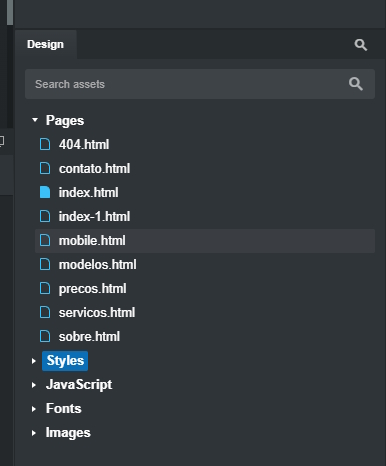
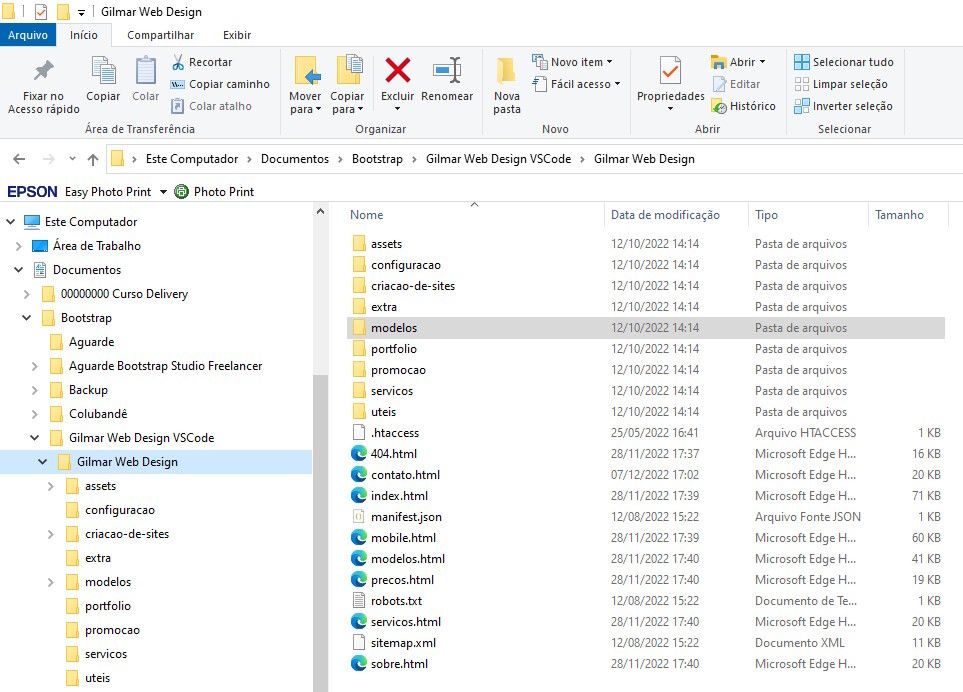
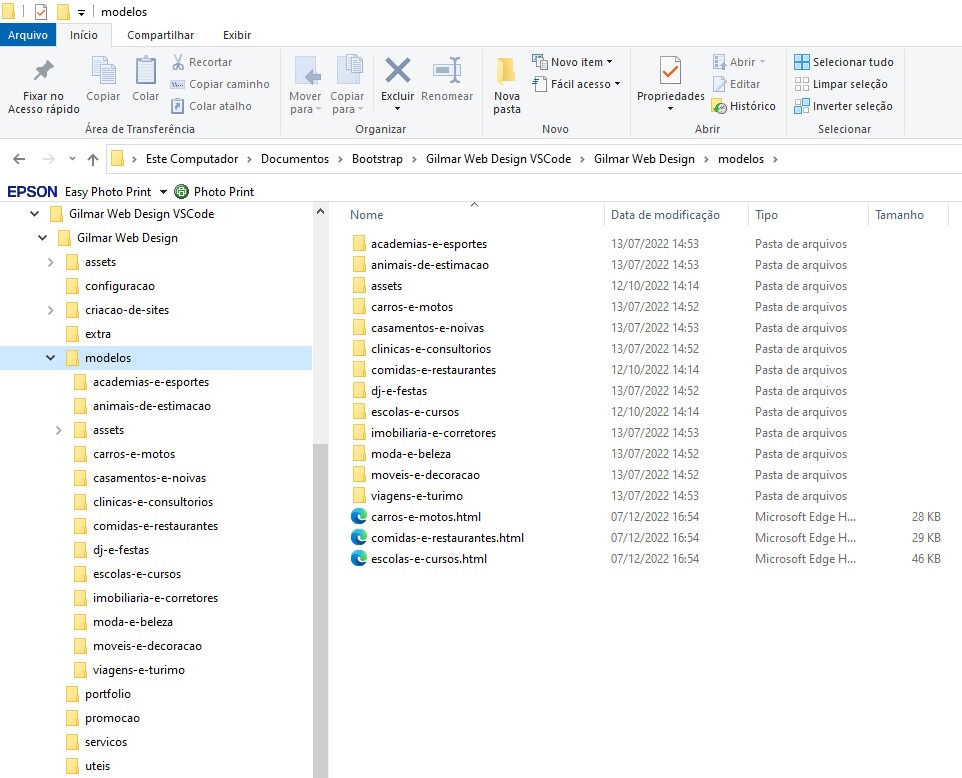
The importing of sites in this version is very good, I just missed the import of html files, site pages, which are in subdirectories of the site’s files folder.
If it were possible to do the same thing that is already done when importing the site, css and js files in subdirectories of the root folder, it would be something interesting, I will print some screens to try to show visually what I tried to explain using Google Translate.
The import does not bring the files, pages, html inside subfolders.

---
### Author:  [@supply](https://forum.bootstrapstudio.io/u/supply)
#### Post date: [April 4, 2023, 3:09pm UTC](https://forum.bootstrapstudio.io/t/version-6-3-0-is-out/9848/21 "2023-04-04T15:09:26Z")
Using your Youtube video “What’s new in Bootstrap Studio 6.3” as a guide, we downloaded the same “Arsha” (free version) web site (from [Bootstrapmade.com](http://Bootstrapmade.com)) and attempted the import (We’re now on BS 6.4), just as in the video. We have a background color but don’t get past the preloader. It does not load. Any insight?
(RESOLVED!)