I’m trying to get the variants (styles) of a Google font to show up in the font menu. I’ve selected them in the Fonts pop-up dialogue box be they do not appear anywhere in the BSS interface.

Assistance would be greatly appreciated.
I’m trying to get the variants (styles) of a Google font to show up in the font menu. I’ve selected them in the Fonts pop-up dialogue box be they do not appear anywhere in the BSS interface.
Assistance would be greatly appreciated.
To use different font weights you use CSS to select these, for example thin would be:
P {
font-weight: 100;
}
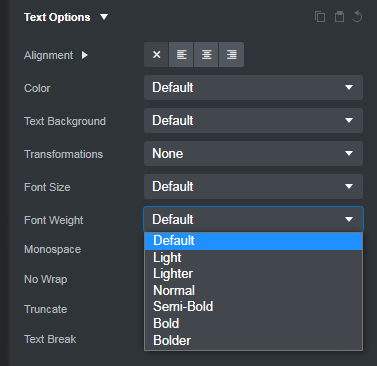
You can select different font weights by selecting text in Bootstrap Studio, then going to the options tab and under Text Options choose from the Font Weight drop down choose from those options, not all of the options will work however and you will either need to create your own classes, or edit the Bootstrap and import it back into the program.
I hope this information helps!
I tried:
H2 {
font-weight: 400;
}
And nothing changed.
Does the font weight change if you apply the classfw-normal to the H2 element you have selected?
After you activate the various font weights, you should be able to set them through the Text Options > Font Weight dropdown menu…
Also, make sure you’re not adding any changes to the HTML via this menu…


Thank you very much!!!