I am trying to put a color overlay over the top of my hero carousel image in my carousel. At this stage I cannot get this to work. Anyone have any ideas?
There are a couple of ways to do this. If you just want to have a colored element on top of your image, you can do it like this…
- Drag a div component into your Slide
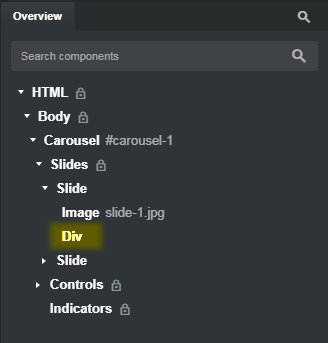
-
Select the Div in your Overview, then go to the Attributes panel and in the Class Names field add
slide-overlay -
In your custom CSS stylesheet, create a class called .style-overlay and give it the following rules…
.slide-overlay {
  position: absolute;
  top: 0;
  left: 0;
  height: 100%;
  width: 100%;
  background-color: rgba(255,0,0,0.25);
}
That will give you a red-tinted overlay on your image. You can change the color and percentage of the opacity to control how much the image is tinted.
If you want a more sophisticated method where you’re actually changing the color of the image, you can do this…
.slide-overlay {
  position: absolute;
  top: 0;
  left: 0;
  height: 100%;
  width: 100%;
  background-size: cover;
  background-image: url("slide-1.jpg");
  background-color: rgba(255,0,0,1);
  background-blend-mode: multiply;
}
Here, you’re basically putting your image into the slide twice. The first time is just the normal way, where the image gives the slide its height. The second time you’re adding it as a background image in the Div we created earlier, but now you’re using the background blend mode to have more control over how the color overlay affects the image. With the color set as solid red with an opacity of 1, multiply will give it a strong red color. You can experiment with other blend modes, like luminosity or screen, and you can still change the actual background color and opacity.
Lastly, you can forgo the slide-overlay Div method above (delete all the aforementioned CSS and the Div) and just use a filter directly on the image itself like this…
.carousel-item img {
  filter: hue-rotate(130deg) saturate(120%);
}
You can experiment with the hue and saturation values using the Appearance panel, and then copy the generated inline CSS into your custom CSS rule above.
If you use the first method, with the Div, you’ll have to add a Div to each slide. If you use the filter method, it will affect every image you add to your carousel.
If you want to have different color overlays on different slides, you’ll need to write more complicated CSS.
Thankyou for helping me with this.
I am also having trouble creating a card slider. I used the Swiper compinent in BS studio and i put 3 cards in each slide.
On desktop it works perfect, but on mobile it shows the 3 cards all squashed up. I would like to know if there is a way to have it display say 1 card in mobile and the what ever it can fit as the device size gets bigger.
Do you know how to do this or is there another way to build a card slider in BS studio.