Hi guys,
I don’t know if it’s me but I think it’s a bug.
Image attached.
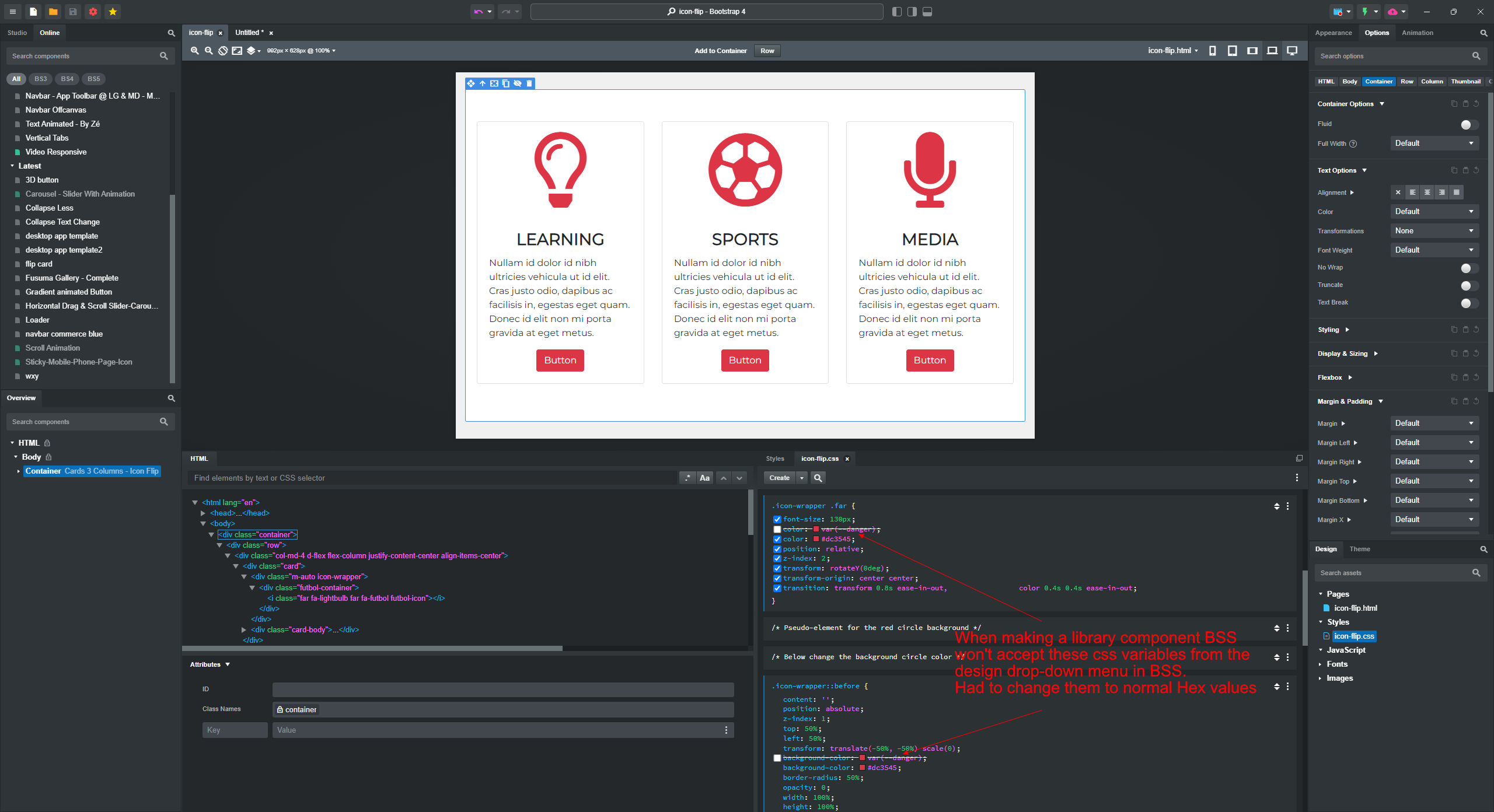
When making a Library Component and using the dropdown menu in BSS - when selecting the Danger color for a background & an icon in a CSS file, it selects this BS danger var “color: var(–danger);“ but it doesn’t work when testing the new live component from the library & defaults to black.
I changed it to a normal Hex value & all was fine, the component is “Cards With Icon Flip“ in case you want to know, it’s shared online.
But thought you’d like to know.
It may be something I’ve done wrong but I don’t think so.
Cheers
Chris
Bootstrap variables are prefixed with --bs-, so you should use color: var(--bs-danger) instead of color: var(--danger). To use var(--danger) without the prefix, define it in the :root selector like this:
:root {
  --danger: red;
}
The :root selector, where custom CSS variables like --danger are defined, must appear in the stylesheet before any elements that use those variables (e.g., var(--danger)). For example:
:root {
  --danger: red;
}

.element {
  color: var(--danger);
}
1 Like
Hi @kuligaposten,
thanks for the reply.
I’m a little confused on your explanation as this is what was already in the BSS dropdown menu when typing color & I scrolled down & selected the –danger variable.
I haven’t created it, it already existed as seen in the attached image.
How come it exists but is an incorrect format?
Sorry if I’m missing something here.
Cheers Chris
If you’re still using Bootstrap 4, its variables don’t have a prefix. I noticed you shared “Cards With Icon Flip - BS5,” so I assumed you were using Bootstrap 5. Here’s a similar component using Bootstrap 5 with SVG icons: custom-card-icon-flipper.bscomp
1 Like
Thanks @kuligaposten,
yes the new blank document is bootstrap 5.3 as in attached image.
Are you saying it’s got something to do with using Font-Awesome 5 icons instead of F-A-6?
Cheers Chris
SOLVED
Thanks again @kuligaposten for your help, I see what I’ve done after delving into it deeper.
I don’t know how it happened but the component once I viewed it online was Bootstrap-4.
I had about 10 component previews open at that time & can only think I deleted a Bootstrap 4 one on a page and saved over it.
My new blank files are always Bootstrap 5.3
So I’ve remade it and tested the colour variable issue and indeed it worked as @kuligaposten suggested, it is now being bootstrap-5.3 using var(–bs-danger) from the Dropdown menu and working as expected.
Cheers Chris
1 Like