Not entirely sure whether I am doing something wrong or whether this is a bug.
I’m building a website using the Agency premium template and have added several items to the dropdown menu. These items have links set up for them to other pages on the site. When I click on them in the preview, they usually work. But in about 20-30% of the cases, when I click on them in the preview, the target link flashes on the browsers URL bar for a brief second before being replaced with the home page, effectively making any dropdown link sometimes link you back to the homepage instead of to the page the link refers to.
Digging a bit more, it seems the problem is the pages I link to (by selecting a page from the drop down next to the URL field in the menu item) are in a subdirectory.
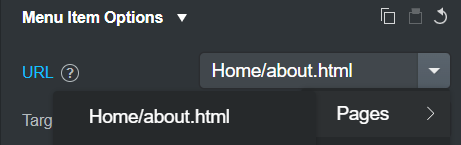
The page link is correct from the root, but any page link from one of these subdirectories is not. In the preview and in the export, from the website root the above will show http://192.168.1.65:8000/Home/about.html but after clicking on it and going there, the link will show http://192.168.1.65:8000/Home/Home/about.html - which in an export causes an error and in the preview causes the browser to be redirected back to the home page.
Am I doing something wrong here? Or is this a bug?
