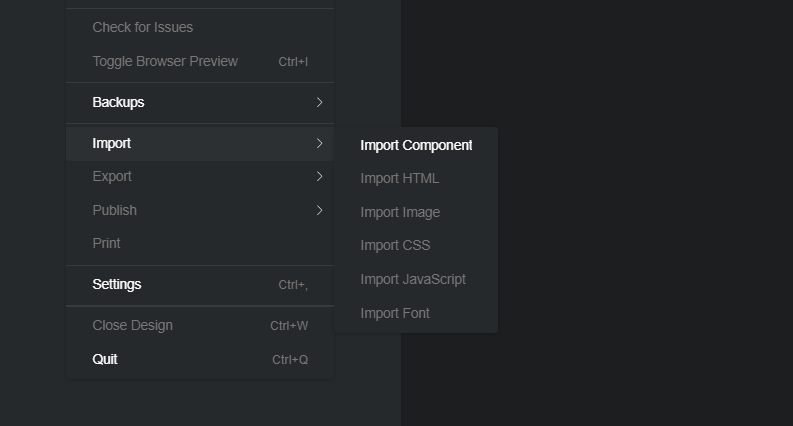
seems that importing html is none functional is there a reason why, most jobs i have are where site are build i go in and edit to fit the customer. as i had been reading on other post. i see this option does not work for visual don’t know is this option is still in for updating cause i do not have html import at all on the life time version its all blanked out.
Hello, welcome to the forums!
It looks like you are trying to import HTML, before creating a project. Once you create a new project file you’ll be able to use those options from the drop-down.
If you have further issues, please try following the instructions here and let us know what step you had issues with.
Hope this helps!
ok yea i figure you could import from a normal html to edit whats been designed. all it is, is to edit the parts changing names adding content. i use to use this long time ago.
I believe Bootstrap Studio’s html import is more for when you’re wanting to import the HTML to use it to build a new website in Bootstrap Studio. BSS, IMO, is not well suited for editing HTML.
For HTML editing of an existing website (when a Framework is not involved,) I generally use Pinegrow, but it’s a bit of a pricey option for just HTML. One nice thing about Pinegrow is it shows the live website in the workspace, so when you edit your HTML, you instantly see the change. There are a lot of online HTML editors that do this as well, but for actually maintaining the structure and working on an entire website, I like Pinegrow.
There are other HTML editors out there… Visual Studio and Notepad++ are probably the most well-known ones. I played around with Coffee Cup free HTML editor. It wasn’t bad. I think I tried KompoZer. openElement. Once upon a time, I used to use Dreamweaver.
it’s all good i got it worked out with another system. like the program though
1 Like