I have some padding set on a section - it’s 3 on XS, SM, MD and LG. On these breakpoints, I can grab the handle for padding and adjust as needed through the interface.
The problem I just discovered is, on breakpoints XL and XXL, the padding is much larger, and although I can see the padding handle, it won’t allow me to drag it to adjust it.
What could be wrong?
Also, just so I know - when you change something on a breakpoint (like padding), does that affect all LARGER breakpoints, or does it affect all SMALLER breakpoints as well?
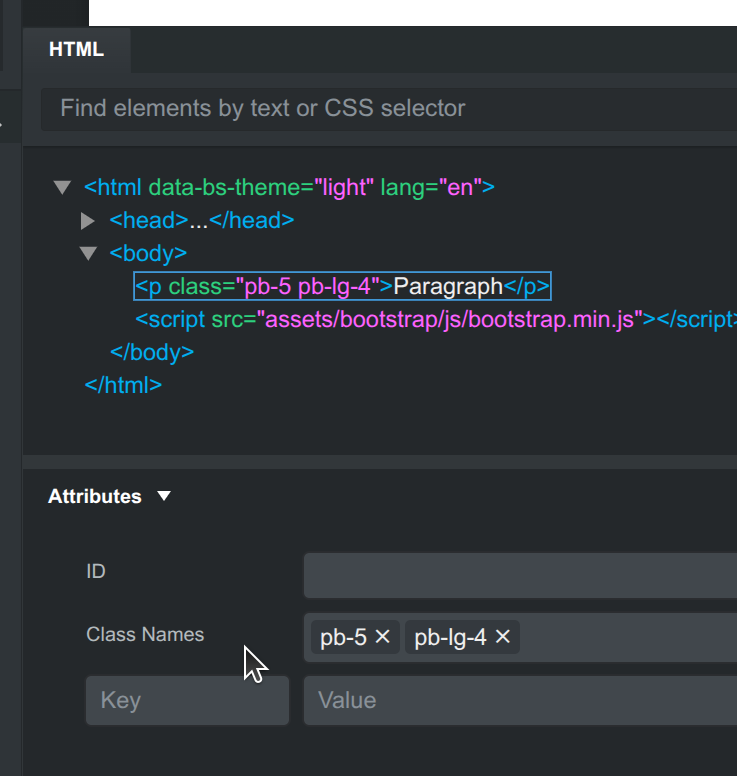
Most likely you have another class for a larger breakpoint. The quickest way to fix this is to expand the bottom panel and see the Class Names field. Just delete the class for the larger breakpoint by pressing the X. In this example it’s the pb-lg-4: