I have several sections on the page and I would like to put a separator bar between then so the bottom padding is zero, the separator bar with 0,0 and the top padding on the section below is zero. Yes it is not elegant, but it works for this quick site. What is the best way to acheive that look?
It is difficult to conceptualize what you’re trying to do just from your description. It would help if you posted a picture, or a link to your website.
Sections have no padding unless you’ve added padding manually. Without any components between them, Sections will touch each other. If you add something between them, they will be separated by the vertical height of whatever it is you’ve added.
There’s no component in BSS called a “separator bar.” If you’re talking about a horizontal rule (the Hr component), the horizontal rule has a vertical (y) margin of 1 rem by default. If you place a Hr component between two sections, it will look like this… (I added text and a light gray background color to each section, otherwise they would have no appearance, since they have no height when there is no content inside them.)
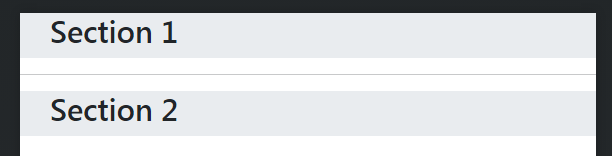
If you don’t want the Hr to have any margin, you can simply add the utility class m-0 to the Hr component through the Attributes panel. Then it would look like this…
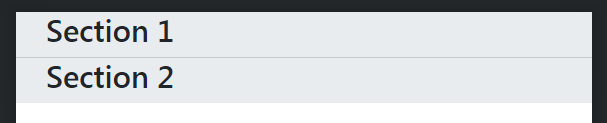
As you can see, the line is very light. This is because the Hr Component has a default opacity of .25. If you’re looking to create a clear visual separation between the sections, the horizontal rule component is really not the best choice. You can make the Hr more prominent by editing its CSS and changing the opacity to 1, but personally, if I wanted to create a clear horizontal division between the two sections, I’d simply add a border to one of the sections.
For example, here is the same layout without the Hr component, and the utility classes
border-top
border-1
border-dark
Added to the bottom Section via the Attributes panel…
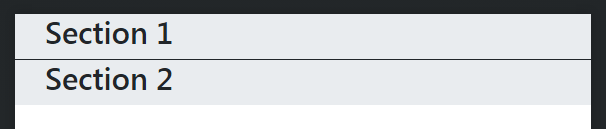
If you don’t want to use a border on the Section, and want something actually separating the two sections, you could add a <div> component in between the two sections, and put the same utility classes on the <div>
To get the most out of Bootstrap Studio it really pays to learn CSS and the Bootstrap utility classes so you can style your components as you like. A lot can be done through the Options panel, but learning the utility classes gives you more granular control. If you don’t learn CSS, you will always be somewhat limited in your understanding of how to style your website. You can also accomplish this sort of stuff through the Appearance panel, but then you are adding inline styles, and that starts to get messy quickly unless you extract the styles to a CSS stylesheet. This is an option, and the software provides a straightforward way of doing this, but it’s a lot faster and easier to just learn CSS, and create your rules as you need them.
1 Like