Hey guys! Over the last several months we’ve been working on a built-in CMS within Bootstrap Studio. It’s free and will be part of our upcoming release which will (hopefully) be arriving in late September. This is just a sneak peek for our favorite forum users
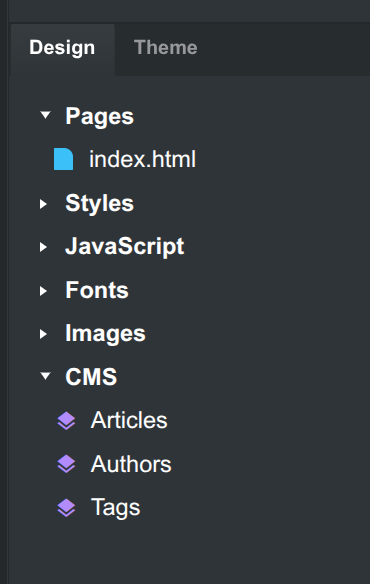
The CMS is fully local and lives entirely within the app:
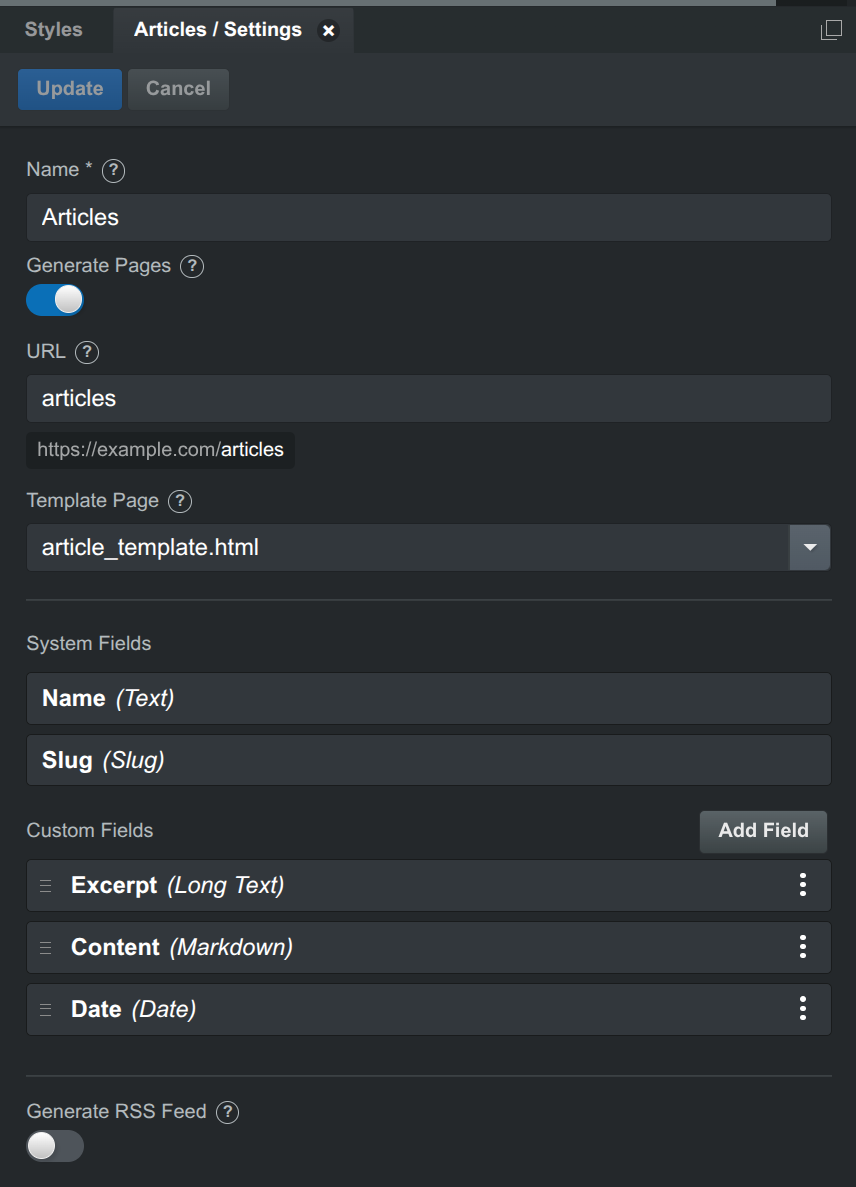
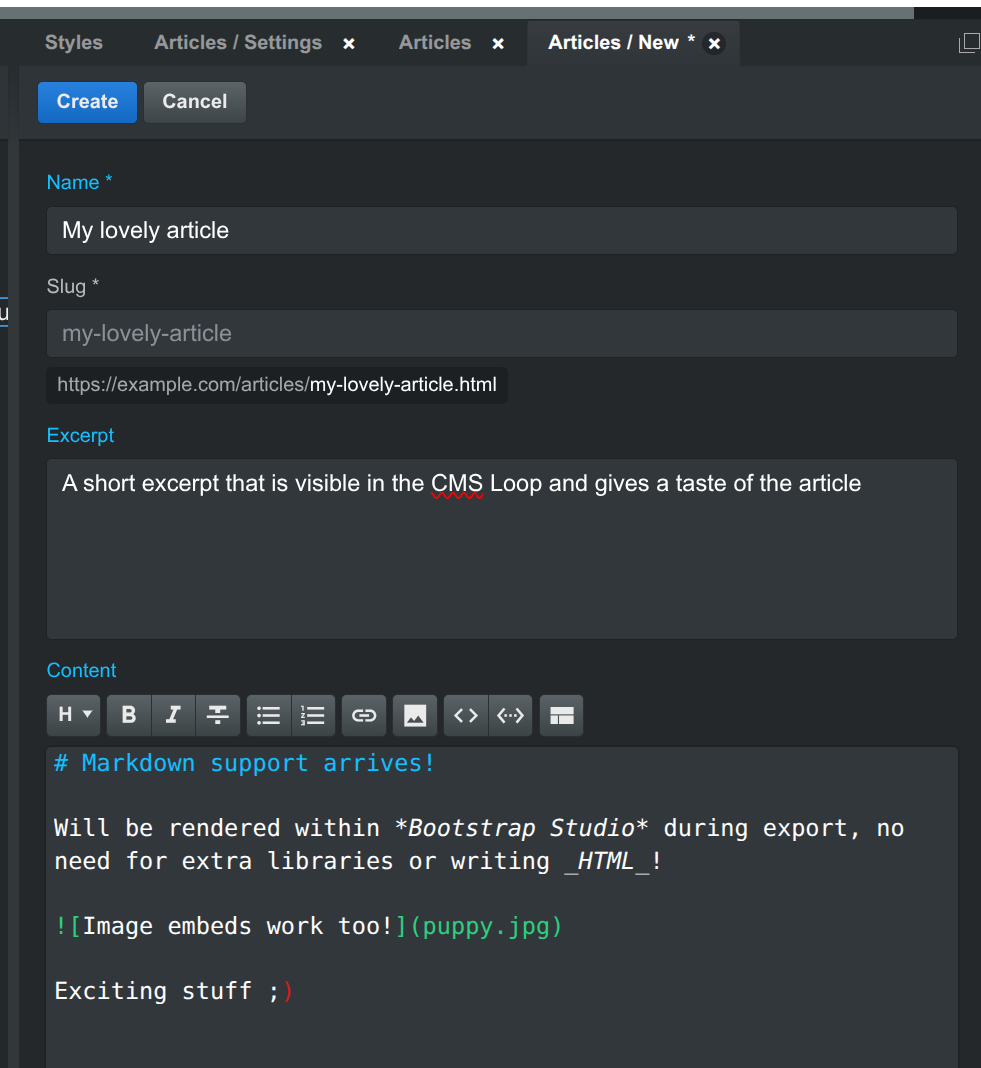
It’s like a mini database built right within Bootstrap Studio. Then you can write the items with markdown support (oh yes, a markdown component is also coming!):
The items are rendered as pages during export/publish, you can have thousands of items in each collection, and the app will still be fast. This replaces our older Blog functionality, all old designs that use the Blog functionality are transferred to the CMS automatically and everything will work.
We overhauled the Blog Loop (now called CMS Loop) added conditional expressions and classes, binding elements to CMS variables, added support for RSS and quite a bit more. We will share more as we near launch, but we’ll be happy to answer questions
Intriguing , once exported / published does it include the ability to edit content remotely on live sites, or does the entire lifecycle occur within the BSS app itself ?
It’s going to be just like the current Blog function, all content is managed within the application, and it then generates the pages upon export. So, it won’t be a client solution. But will be good for small projects and individuals.
The CMS is fully local, the data and editing UI lives inside the app. It’s like an advanced static site generator that renders static HTML pages.
In contrast to the Blog functionality which loops pages in your design, CMS is organized around collections of items with custom fields. This opens the door to building a real web based editing UI in the future, so sites can be maintained outside of bootstrap studio. We have quite a bit of work before then though.
Thanks for the response @martin much appreciated! Sounds like it’s headed towards a calculated approach for nice further expansions, which is great to hear amongst the current feature rich third party CMS offerings available.
Looks really feature thoughtful within BSS already, thanks for the sneak peek.
This sounds great. So current blog post type pages will automatically convert. With no problem then.
Will there be any other AI integrated updates as well??For connecting to local models or maybe even a…MPC So, models can connect through MPC and basically run the program.
Yes, we will be updating the AI assistant with the latest models and will add support for more local apps like Unsloth Desktop. MCP is not planned though.
From now on, is the Pages section intended only for standard site pages — for example About, Terms, Index and so on — and the CMS section reserved for article‑style content and related material?
If that’s the case, what happens to existing pages that users currently treat as articles? For example, if I already have around 150 pages, would I simply drag and drop them into the new CMS section, and then update and organise them from there, or do they stay where they are?
Will the CMS also allow proper organisation of articles, such as creating subfolders like articles/internet/software, and give control over the URL structure in a way that the Pages section doesn’t?
I also noticed a “template page” option in the screenshot. Does this mean you can create a reusable template — for example, by adding components — and then use that layout repeatedly for new pages?
I just recently started using Unslosh, that’s my new go-to item now. I have it making images with z image turbo and just loaded in Qwen 3.8 flash next yesterday it runs on my Mac with 128 gig of ram - it runs fast and make websites very easy I tested it on that making a few test sites, I will give it project info on making sites for BSS. and now with the new Qwen Image 2.1 that just came out last night, I’m hoping to load that into it here soon to.
It would be nice if you could put out an instruction page we could download to install into a project into Unslosh that gives that project all the information it needs for creating Bootstrap Studio pages and designs so it does it correctly.
The new Qwen 3.8 flash next even can see things now. Even doing web searches, it will pull up web pages and images. It basically does everything that a Google search does now. But even with 128GB of RAM, I will run out of tokens to use it If I’m using the thinking parts, I can be on medium thinking, and I’m limited to just over 8,000 tokens. But I can turn thinking off, and then I haven’t hit a limit yet on that.
Quick update: After some testing we decided against transitioning sites that use the Blog functionality to CMS automatically.
The old, page-based way of building blog/news sites, and the new CMS way will work in parallel. Both will continue to be supported forever and you can use whichever works better for your project.
The CMS Loop component (the new name of Blog Loop) can loop either a folder of pages, or a CMS collection. In other words your existing sites will keep working exactly as they do now.
In a future update we will build a migration tool that can help you turn a folder of pages into a CMS collection, but this won’t be available at launch because it is highly complex and we need to get some feedback on the CMS first.
Your existing site will continue working exactly as it does now. Once the migration tool is available you can transition your content to the CMS if you wish.
For now the URLs of CMS articles are limited to a prefix and a slug. So all entries in the “articles” collection will have URLS like:
The prefix can be blank though, so one of your collections can render its items at the root directly (https://example.com/new-article.html). It won’t be possible to have a different URL structure at the start.
Yes, exactly. The template page will be used as the basis of all items in the collection.
We will add instructions for Unsloth to our AI Assistant docs. The latest qwen and gemma models run well with the Assistant.
The CMS is local in the app. When you make a change you need to upload the HTML files of your site to the server. If you use the Bootstrap Studio Publish feature, you can set it to only upload the changed pages, so only the different files will be uploaded.
Also if you haven’t watched it, you can learn more in the CMS lesson in the academy.


 , once exported / published does it include the ability to edit content remotely on live sites, or does the entire lifecycle occur within the BSS app itself ?