After spending a tremendous amount of time trying to use AI to create pages and then load them into Bootstrap Studio only to see them getting messed up constantly, I thought I had a workaround that was working.
Only to find out that my page load speeds were incredibly terrible. Because when the conversion was going on, it was converting to some kind of tags. At one point it said I had 900 of them.And that was killing my page load speed.
Then after spending more time in Claude. 4.6 I think I have it all worked out.
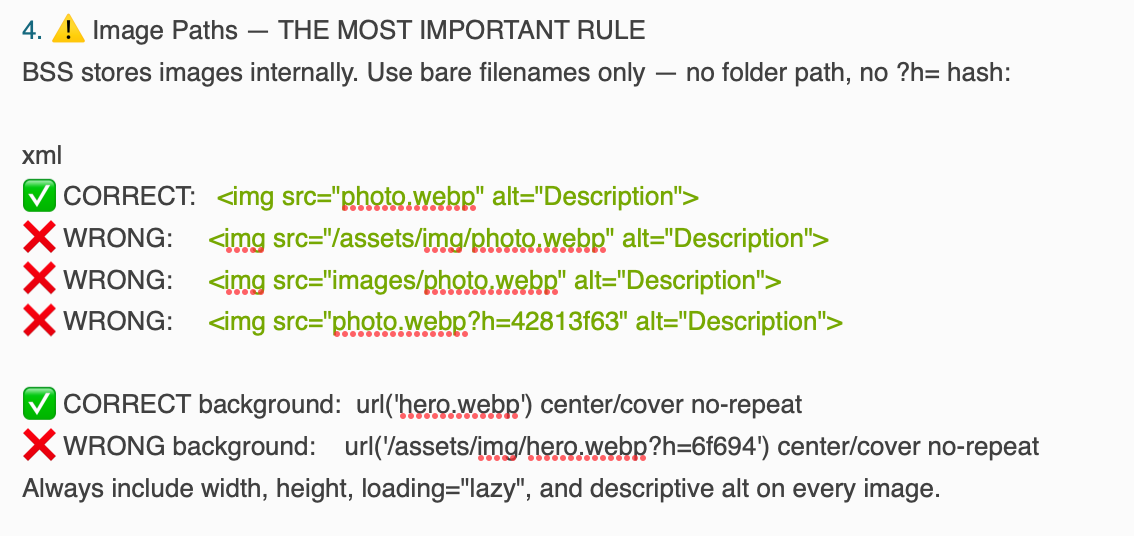
One of the biggest problems is with images. Because AI wants to create images that are referenced in an image folder or an assets folder. But that’s not how Bootstrap Studio works.
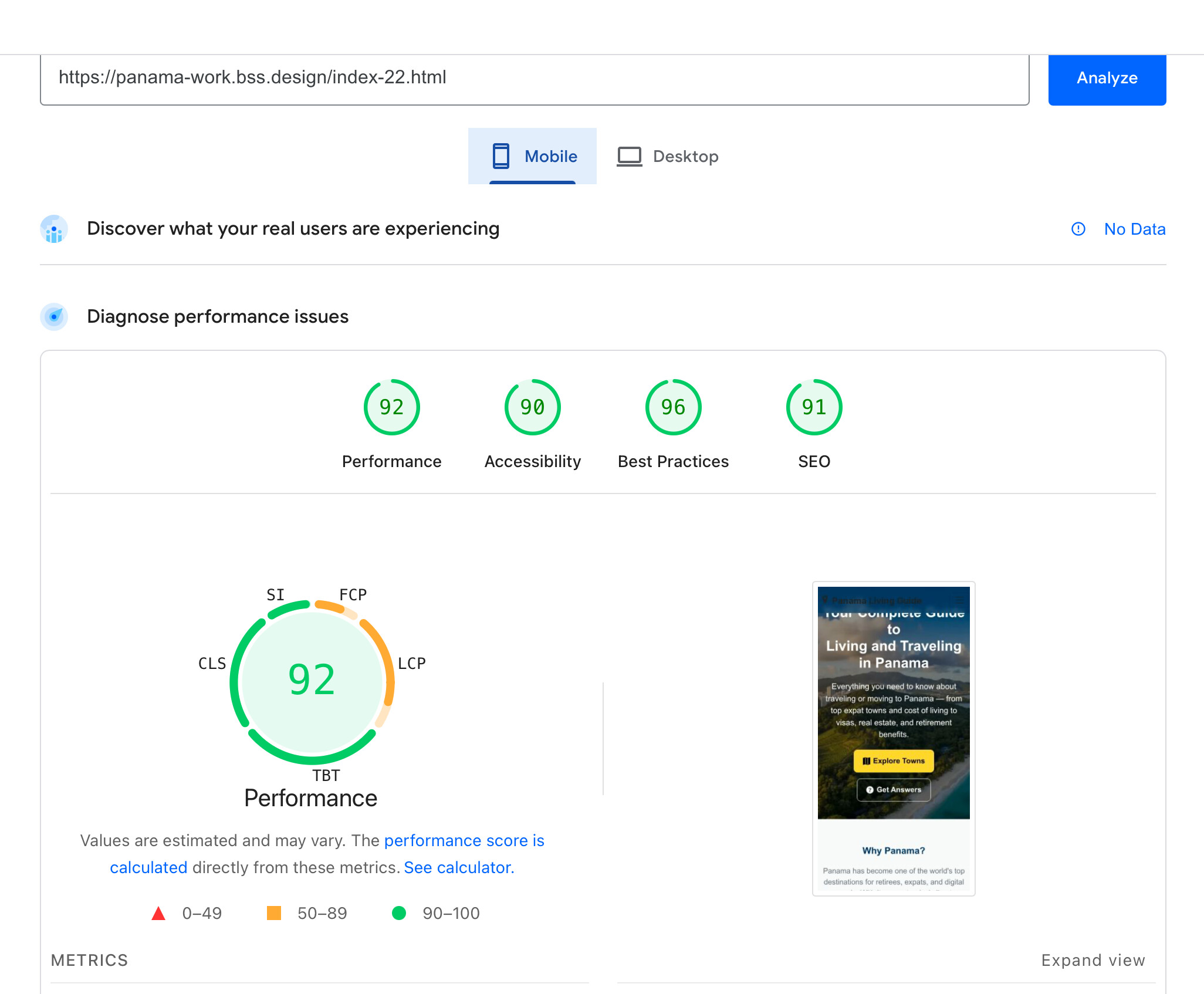
Anyways, I went from a cell phone page speed of 43 in the 70s for desktop to now this new version where Claude is doing it correctly it seems. Now to a 92 on cell phone, and 100 on desktop performance score.
It’s basically the same exact design, but done correctly, at least I hope.
Here’s the reference page that got this score. I might tweak this out a little bit at some point some more. This is a secondary index page. I’ll put this into.
I still have a few things to fix for that problem. This is turning into a very large site.
So after figuring out all these things out, I had Claude write an information page that I could feed any AI that tells it how to write html that can be used in Bootstrap Studio. So down below is that information. It’s going to be very long. I know people don’t seem to like seeing long things, but this is what it created. I can only hope that this is all accurate by showing this page and the better page source that it now created and it works.
It was Kimi K 2.6 that I was using that I thought was doing a great job, but it was not creating the HTML correctly for Bootstrap Studio that created the massive slow loading of the pages I used it on.
And yes, I’m liking using AI because the amount of information that it’s created on all these pages would take me probably months to accomplish. And some of the charts and graphics that it’s made, I probably would have never even thought of, let alone made.
So yes, I am using AI, and will continue using AI. That’s why I’m working on trying to make it work correctly in Bootstrap Studio. I’m also using a local AI in Bootstrap Studio to sometimes fix minor things.
I hope this helps someone. I’ve been telling a lot of people about this program. Once this is all worked out, this could be a fantastic program for anybody to use that’s moving away from WordPress into more static sites. There’s so many new apps coming out to do that when this program already does it And at a great price point.
https://panama-work.bss.design/index.html
I tried to upload both an .MD file and a .TXT file and it will not allow me to upload it. So I have to just paste in all this information. And you would have to grab it and make your own file. I don’t see any other way to do this.
Bootstrap Studio — AI Developer Reference Guide
Instructions for Any AI Building HTML Pages for Bootstrap Studio Projects
Overview
This document tells any AI assistant exactly how to build HTML pages for a Bootstrap Studio (BSS) project. Follow every rule precisely. Deviating from these rules causes broken images, uneditable sections, wrong colors, or pages that fail to render correctly in the BSS editor and/or on the live server.
Bootstrap Studio is a visual web design application that:
Uses Bootstrap 5.3 as its framework
Stores images internally inside the app project file
Publishes/exports to a server where it generates an assets/ folder structure
Parses imported HTML files and Custom Code blocks identically through the same internal engine
- Page Structure — Always Full Standalone HTML Files
Always produce complete, standalone HTML files — never snippets or fragments. Every file must include:
xml
... The data-bs-theme="light" attribute on is required for BSS's theme system to work correctly.- Standard Block
xml
xml
 CORRECT:
 WRONG:
WRONG: 
WRONG: 
CORRECT background: url(‘hero.webp’) center/cover no-repeat
WRONG background: url(‘/assets/img/hero.webp?h=6f694’) center/cover no-repeat
Always include width, height, loading=“lazy”, and descriptive alt on every image.
- Color System — Never Hardcode Hex Values
Use Bootstrap utility classes so colors stay editable in the BSS Theme panel:
xml
bg-primary / bg-secondary / bg-light / bg-white / bg-dark / bg-warning text-primary / text-secondary / text-muted / text-white btn-primary / btn-warning / btn-outline-primary / btn-outline-light var(--bs-primary) / var(--bs-warning) / var(--bs-body-bg)Alternating section pattern:
xml
← CTA highlight 6. Section Structure xmlHeading
Subheading.
← Hero only, ONE per page
← Section headings
← Card/subsection headings
← Large intro paragraphs
← Body copy
← Hero subtitle ← Category badges Heading hierarchy must never skip levels: H1 → H2 → H3 → H4
- Hero Section
xml
Question?
-
Grid Reference
Use Case Classes
4-up cards col-sm-6 col-lg-3
3-up cards col-sm-6 col-lg-4
2-up col-md-6
Wide centered col-lg-10 mx-auto
Narrow centered col-lg-8 mx-auto
Form column col-lg-6
Always g-4 on the row: -
YouTube Embed
xml
per page (hero only)
Heading hierarchy H1 → H2 → H3 — never skip
Every has a descriptive alt
Every section has a meaningful id
loading=“lazy” on all below-fold images
width + height on every
filled in
Open Graph + Twitter Card tags filled in
set- Never Do These
Never use folder paths in src — bare filenames only
Never include ?h= hash parameters
Never hardcode hex colors
Never use Bootstrap 4 syntax
Never use a local Bootstrap file — CDN only
Never nest inside another container
Never nest inside
Never use blocks in the body
Never leave alt=“” empty on meaningful images
Never use more than one per page
Never skip heading levels
- When Starting a New Project — Ask the User For
Site name and domain
Color scheme / theme preferences
Navbar links and page filenames
List of image filenames already imported into BSS
Any existing pages to match style from
Font preferences
Any custom CSS class names in their stylesheet
Bootstrap Studio (latest version) · Bootstrap 5.3