Support floating labels

Its not a well known feature of Bootstrap 5, but there is a component called Floating Labels. This component does have official Bootstrap documentation, however it is unsupported in the application.

Here is an example of a floating label input

floating-label

Here is a code example

<div class="form-floating mb-3">
  <input type="email" class="form-control" id="floatingInput" placeholder="name@example.com">
  <label for="floatingInput">Email address</label>
</div>

Please can this component be added to BSS? This will maintain further parity between Bootstrap, and Bootstrap Studio and make this element more readily accessible for use in designs.

If you are interested in this being added to BSS

Make sure to leave a comment, or like this post to help the developers gage the communities interest in this feature.

10 Likes

Thank you for the suggestion! We will look into adding this.

3 Likes

I would like to see this added as a component.
Honestly, I’ve always just went to the Bootstrap Docs each time I’ve needed to create one.

I keep forgetting to save one as a custom component :sweat_smile: so it would be a nice addition.

1 Like

Hi @martin, could we get this in the next feature release? If it’s been added, I’ve not spotted it yet :eyes:

2 Likes

Just checking, is this going in the next feature release @martin?

Yes, this is will be part of the upcoming release, but it’s just a component in the UI > Forms group with a div and an input + label. It’s not an option to the existing input components.

@Martin,

I’m incredibly disappointed with how floating labels have been implemented in V9.

I know you mentioned before release that this would simply be a component rather than an option for existing inputs, but I didn’t fully appreciate how limited this implementation would be.

What is provided in this update is a hardcoded email input with a floating label. If I want to use another input, such as a text input, you have to manually change the input type, ID, label, for attribute and placeholder.

Having to update all of these components, it is faster and easier for me to write the HTML myself than use the component. Since BSS is a visual site builder I would like to make use of its features, rather than adding HTML.

As I mentioned in my original feature request, this was also about bringing greater parity between Bootstrap’s official documentation and Bootstrap Studio. Floating labels are a standard Bootstrap feature, supporting various input types, textareas and selects.

I’ve spent years supporting Bootstrap Studio, recommending Bootstrap Studio to others, and even buying licences for friends. This is the single feature I’ve consistently asked for, and I’ve waited patiently through multiple releases to see it in the program.

I genuinely struggle to understand how this was considered a useful addition in its current form. Futher, there is the mb-3 class added, standard inputs do not define spacing, that is up to the user.

I’m not expecting every feature request to be prioritised, nor am I expecting some huge overhaul of the application. But I would highly appreciate if this could be re-visited in future and for floating labels to be implemented in a way that makes it intuitive for users to use.

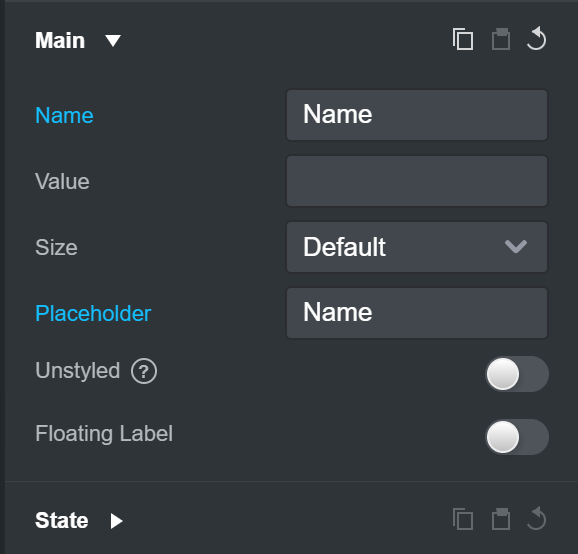
I would rather that I be able to drag a input type into my design, setup its name and placeholder and then flick a toggle to make the selected input one that has a Floating Label by the application adding the Label for me and correct HTML, and for the Label to use the set name for the display name on the Label, if that makes sense?

1 Like

I agree that having an option to enable floating labels on any input is the ideal UX for this. You just enable it and get floating labels without thinking about it.

But it has a big complication that makes it very complicated to implement. Toggling the option will change the component from an <input>, to a <div>. This can create a lot of problems for drag and drop, parsing html back to components and other places.

One possible solution is to have two separate components, similar to the Checkbox and Checkbox with Label duo. We’ll just have to figure out how to make it easy for users to convert an input to a floating label version with one click.

This is complicated and we didn’t have time to do it for version 9, but we can work on it for our next updates.

1 Like

Hello @martin,

I fully appreciate you getting back to me about this, and I agree, there’s more to be considered here with how the application will handle these.

Thank you for taking the time on this, I shall be happy to await this feature as you continue working on V9.

I hope you have a good week.