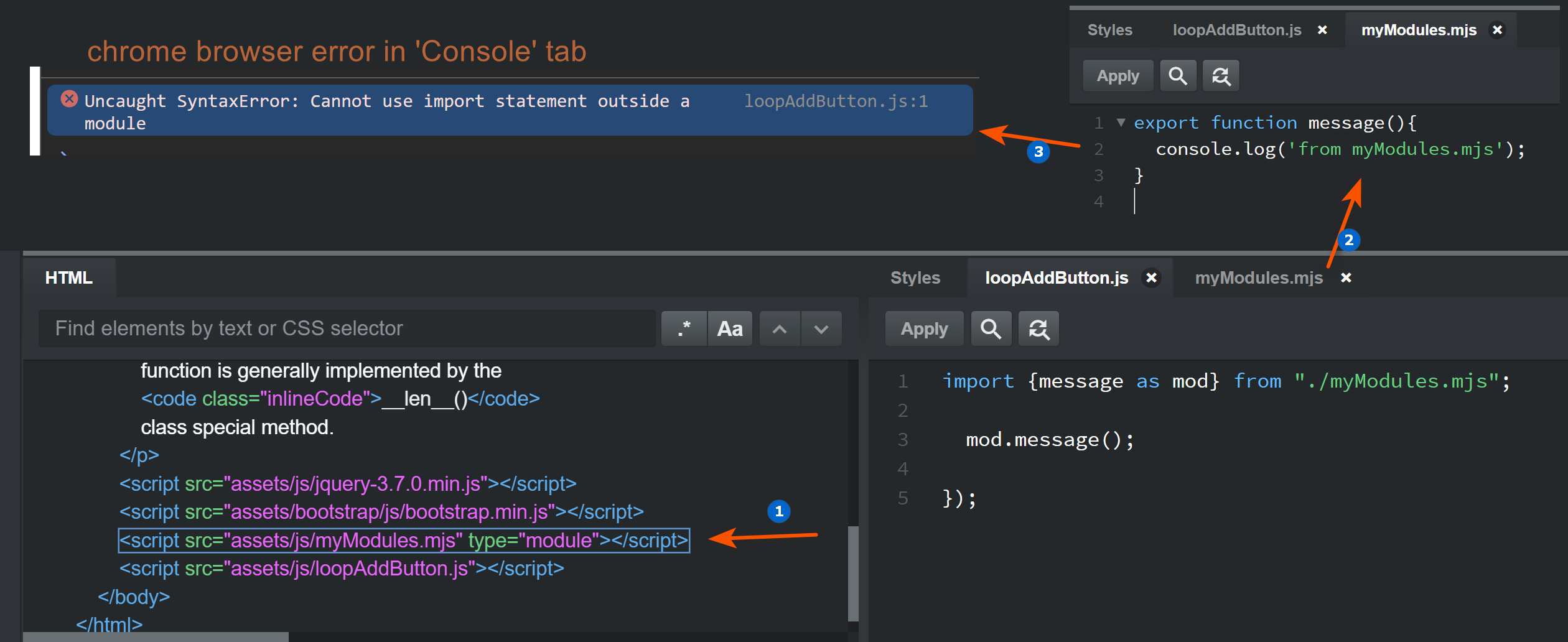
i am enclosing a screenshot the show the 3 parts of my issue when I try to import a module.mjs file and use a function. its a simple example, but I get an error in chrome browser…
- export statement exist in ‘module’ file
- type= ‘module’ is added under <script src
- import statement exists and invoke the function
screenshot show the specifics… LMK if anyone sees somthing i should change. thanks
UPDATE:
after experimenting a little more, this is what i found.
- module file (with your functions) must be .mjs file. (exporting file)
- main JS script file must also be .mjs file (importing file)
You can just right click the Javascript folder under ‘Design’ tab and select new → JS Module, a file with .mjs extension will be created AND it will create the <script src=’yourfilename.mjs’ type=’module’> for you in the HTML. you need 2 of these JS Module files to export and import functions.
ive read and seen many videos where a standard JS file can be used as your importing main file and type=’module’ was added to the main file script tag.
Not sure if BSS does this for a specific reason or not, but its working now.
If this is wrong or you can use a standard .js file as importing/main script file then LMK. Thanks
if I’m not mistaken, it is more http server header stuff, especially the mime type for the file.
and since the dev server of bss only send correct javascript module header when it’s .mjs (not when it’s .js), you get this behaviour.