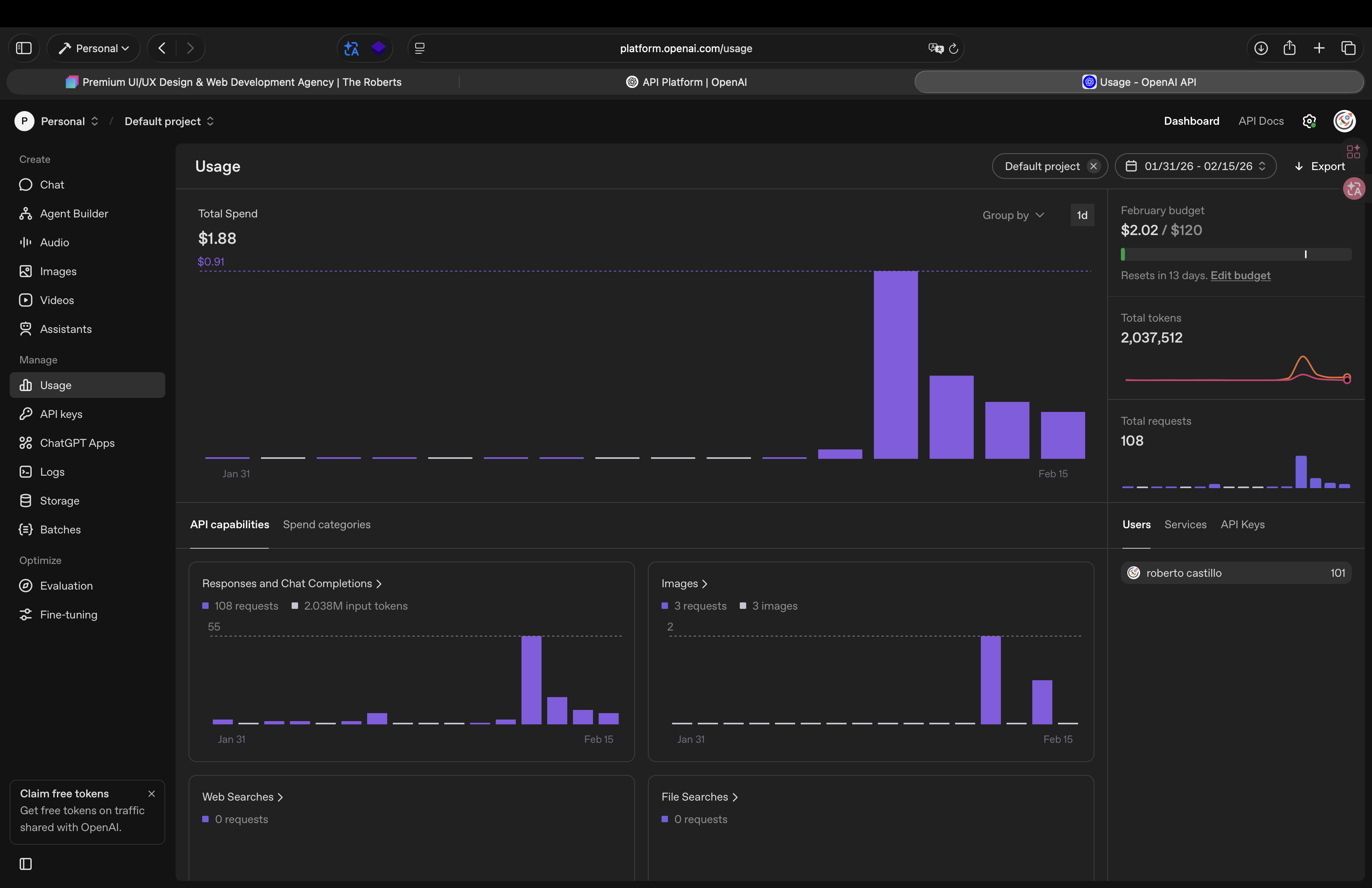
The price of a consultation is unbelievable. What were they thinking? We’re definitely going to need a local model that works exactly like the version 7 model did. That’s the local one. I’m convinced that model won’t be more than 8 GB since the training is focused on the software. Well, actually, two models are needed; the other one has to be for image creation. So, in this way, we have two models: one for image creation and another for HTML editing and content creation. These models shouldn’t be so overwhelming that users don’t have to read all the code, keeping resource consumption very low. My previous API usage was negligible even if I was working all day; now it’s unbearable. A single query costs $0.23 for one element, including reading the CSS and JS associated with that element, and you know what it did didn’t solve the problem. I’ve already spent $0.23 on a single query that didn’t fix anything. So, I hope the next update comes very soon; this can’t go on for a whole month.
If you’re looking for a new way to monetize, I hope you’ll at least give me some credit, unlike what the folks at Universe did. I gave them an idea, and they didn’t give me any credit. Honestly, that doesn’t bother me; what bothers me is that they then kicked me off the platform. Anyway, it was amazing. After a long journey, I took a chance on you, and here I am. The monetization idea is to create three separate models: two local ones and one that you maintain in the cloud and update regularly. You sell the local ones as a one-time payment, and the cloud one can operate on a subscription basis. The difference between your model and other companies’ models is that your model will create the elements using Bootstrap Studio elements. In other words, your model will be able to set up e-commerce using Reflow elements. It will be able to use blog elements and configure them so that you only have to create the page in the corresponding folder. And that’s how you create a necessary subscription service.
I use Terminal Agents, such as Gemini CLI.
It would be a nice touch to also include support for those as well.
Edit. I just saw someone mention Free Gemini plan, basically what Gemini CLI is.
Soooo, I’m looking into this instead.
2 Likes
The 8.0 video is quite misleading!
For days now, I thought that BS had become a subscription model because that’s what you see at the beginning of the video. But apparently, it’s more of a demo page created with BS.
I have V7.1.2 (Win) and apparently 8.0 is not included as a free upgrade.
How do I get 8.0 now? Buy it again for £29 on the homepage? And these AI credits are then optional and subject to a charge?
I’m a bit confused…
It depends which version you bought.
• Standard version – the cheapest option – includes one year of updates.
• Lifetime version – the more expensive one – includes updates for the lifetime of the product.
“Lifetime” might be a touch optimistic, but you’ll certainly get updates for a long while.
2 Likes
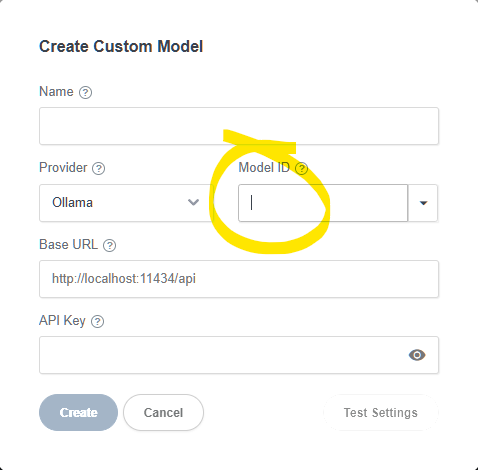
Thanks for the guide, how did you get the model IDs to populate? Nothing is showing up in my drop down box (expose ollama is on).
Can you share some screenshots, I’m not sure what step you’re stuck on
I mean the create custom model screen and the model ID section. Even with the name/base URL filled out nothing shows up in this box, so I can’t complete setup.
The opening shot of the video is a screenshot of one of the templates, it didn’t come to mind that it might lead people to think it is referring to the app itself going subscription. We’ll be more careful in the future. I can assure you there are no changes to the app or its licensing.
You can use the Help > Renew License menu to upgrade to Lifetime. Or you can keep using the version you already have indefinitely without renewing.
The first users who bought Lifetime have enjoyed updates for 8 years already. This is longer than other companies have stayed in business 
I see how this could be confusing. The dropdown in the model id only has some examples. It won’t populate automatically. It is expected that the user copies over the actual model id from Ollama/OpenRouter etc. We will improve the dropdown and help tooltip to make this clearer.
3 Likes
Ahh I understand now, I manually enter the model name, got it. My suggestion would be to remove the drop down icon when ollama is selected to help make it clear it’s a text entry box only, and not a model selection box.
Hi, since I already tried some LLMs integrations with VSCode, I was trying to do the same with BSS.
For context, I don’t use Ollama but LMStudio. In this case, I’m using qwen3-8b (which fits nicely into my 8 GB of VRAM).
When I add the custom model and I press the Test connection, I see a Success pop-up on the bottom right corner.
But the issue lies when I use the assistant. Every time I press Enter or I click the Send message icon, the window just refreshes and nothing happens.
On LMStudio’s server, no connection is being received at all.
Is there something missing, or isn’t BSS supposed to work with this LMStudio?
Thanks!
I added my Anthropic key and the Anthropic models show up in the dropdown, but Opus 4.6 doesn’t show up.
I finally had a bit of time to try out LMStudio. It works with the Anthropic provider when creating a custom model. So basically just add this config:
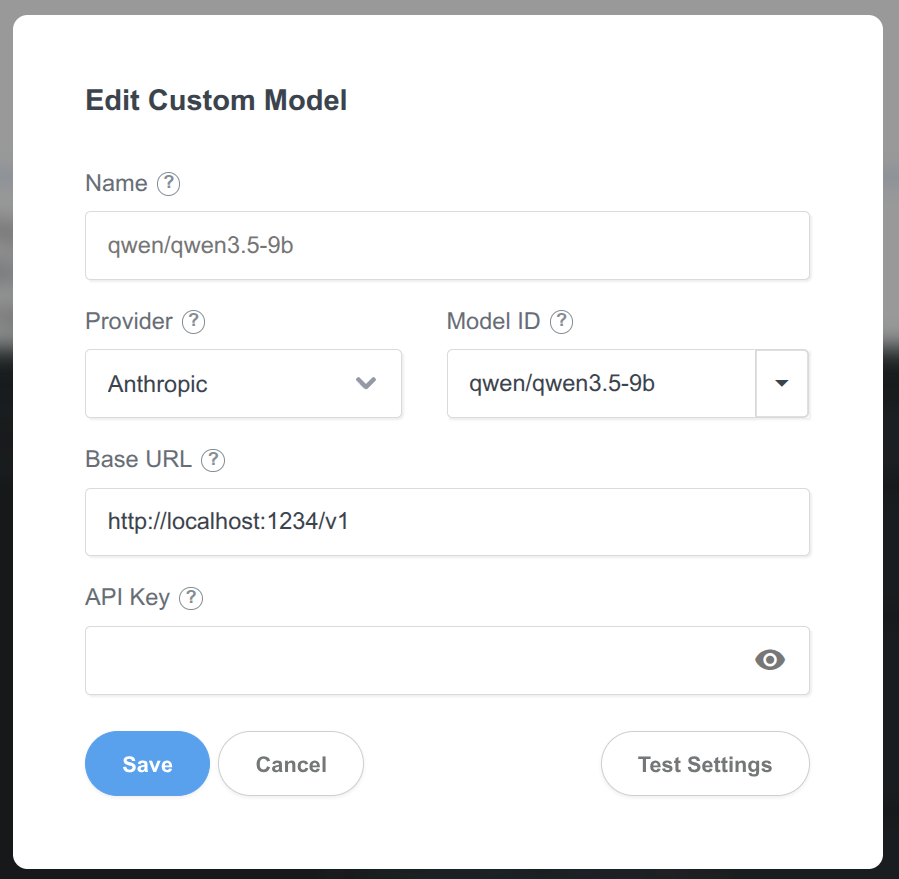
The list of built-in models is hardcoded. We will add the latest anthropic models in our next update. If you wish to access 4.6 right now, you will need to set them up as custom models.
1 Like
Thanks a lot @martin you’re the GOAT! 
Just out of curiosity, why is the provider Anthropic instead of Ollama? Is this the way LMStudio handles their API endpoints?
Really new to web design and trying to work my way around all the jargon. the AI option I find really interesting but the Video tutorial for this is lacking in proper detail. API keys are required but no real detail or explanation on how to get one, more importantly a free one and what limitations come with that to get us started and what kind of costs involved in purchasing one. This whole AI crack is still relatively new to me and I need some help. Now go easy folks. I’m on the wrong side of 70 but still like to try and learn new stuff. Any help would be appreciated. Regards Jerry
My recommendation is to get comfortable with web design principles and jargon before using AI. That way, you’ll know what to ask the AI to do, and you’ll understand what it is doing (which may not be the same thing!).
I did manage to get a free Gemini API working with BSS. It took me a while to work out how (mostly because of Google complexity).