Version 8.0 is out!

Hey folks! We are launching Bootstrap Studio 8 today.

The highlight is the new AI Asisstant. It replaces our old Assistant dialog, and is much more advanced. It is an agent that works autonomously on tasks, and supports many different models (Anthropic, Google, OpenAI, OpenRouter, including local models) which you can switch between. See it in action below:

The assistant works with your own API key and requests are made directly from Bootstrap Studio to the model provider. The key and requests are fully private and live only on your computer.

You can read more about the assistant and how to get a free API key in this article.

And here is a full list of changes:

New

  • The new AI Assistant is here! You can find it in a new panel next to Overview. This is a capable AI agent that can work autonomously on tasks you give it. It can edit your site, write text and code, create pages and generate images. It works with your own API key and doesn’t impose any limits. Supports models from Google, Anthropic, OpenAI, OpenRouter and local models.
  • We added two new beautiful premium templates. Freshify is perfect for building product and SaaS websites, and App Toolkit is focused on web apps, dashboards and admin panels.
  • The app now supports View Transitions. You can find the setting in the Animations tab. Setting the same view transition name on two elements on different pages will smoothly animate one into the other when the browser navigates between the pages.
  • A new tool was added that helps you extract inline styles as classes en masse. You can activate the tool from the Check For Issues dialog by pressing the Fix button in the inline styles report.

Improved

  • The Overview Panel now has a toolbar at the bottom, with quick actions like moving the selected components in and out of their parent, duplicating, hiding and deleting.
    In the attributes panel, you can switch the class field into text editing mode instead of pills, from the three dot menu.
  • The Map component now supports OpenStreetMap in addition to Google Maps.
  • The video component now supports YouTube Shorts URLs.
  • Media queries in the CSS editor now give you an easy way to change the breakpoint from an arrow menu.
  • The Tabs component was improved, and now the tab content can be dragged out of the component and placed anywhere on the page while still being switchable by the tabs. This opens the door to more flexible designs.
  • A new “Find Linked Copies” option was added to the context menu of linked components. This brings up a dialog that helps you locate the other linked copies in your design.
  • You can now reopen recently closed designs from File > Reopen Closed Design.
  • Performance improvements when editing large designs and blogs.

Thank you for helping us by suggesting features and improvements in the forum! A lot of these found their way to this release, and a few others will be coming with our next update.

We’re looking forward to your feedback!

16 Likes

Incredible work guys, so many great features in this build!

1 Like

“Find Linked Copies” :heart_eyes:

1 Like

Thank you!
Finally can use local LLM for this awesome apps!

This is pretty amazing! I’ve just done a test to recreate a current website of mine, which wasn’t built in BS Studio. I’m blown away with how quickly and professionally it did the job.

Thanks very much.

No you can only use local LLMs if you use Ollama.

1 Like

So what’s the point of having BS then. BS just becomes an $80 IDE for vibe coding.

I don’t think the developers thought this through. They’re basically making their own product obsolete.

Great job! What an incredibly disappointing update.

Unless I’m mistaken, this version also opens a project to the page that was previously open (and not necessarily index.html). I like that!

Great update team!

Looking forward to taking this for a spin.

Danm! This is the real game Changer thanks

I love Bootstrap Studio :heart: - Thanks for Updates.

Thanks for this update ! For supporting your team and your work, i’ve bought the App Toolkit template.

Great work ! (missing only some datatables integration for example, but really time saver template to use ! :blush: )

Thank you for the feedback!

@neil Happy to hear you are using it already!

@mliving The assistant is fully optional, you can ignore it and use the other improvements.

@Gondwana Yes, the app now remembers which page was viewed last time :slight_smile:

@larsene We are grateful for the support!

The update is pure fire, but I’d like to know how I can use the Ollama AI I have locally, as I’m not clear on how to do it.

Here is how to do it, this should work similarly across all operating systems.

Installing Ollama

  1. Visit the official Ollama website here
  2. Install the app to your computer, you shall ideally have a NVidia GPU and at least 5GB of RAM

Important! :warning:

Make sure you have at least 5GB of ram FREE. Open the apps you usually have open and check your computers task manager or system utilities to make sure the amount of RAM you have free is still under 5GB.

  1. Open the app. Do not send the model any messages!
  2. Go to the tab in the top left, open the side menu then visit settings. Toggle on the Expose Ollama to network toggle. This allows Bootstrap Studio to send and recieve messages to the model.
  3. Go back to the message box, click on the model drop down.
  4. Search for this model llama3.1:8B, its most likely to work best across all hardware and is of a reasonable size (4.6GB)
  5. Send the model a message, it shall start downloading.
  6. Once its been installed you can then start the setup in Bootstrap Studio.

Setting Ollama up in Bootstrap Studio

  1. Open the Assistant tab, and click on the small settings icon
  2. Select Manage AI Models
  3. Select the custom tab
  4. Click Add model
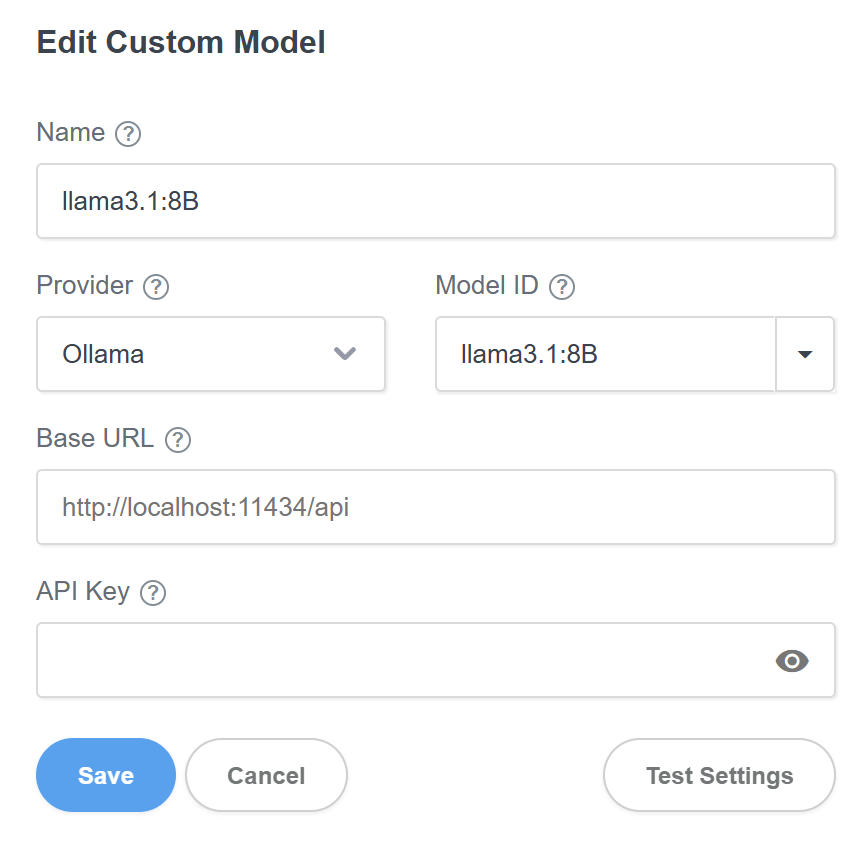
  5. These are all the settings you need to add

You have now set up Ollama!

Thank you very much. You know what happened to me? I was using Codex and Gemini, and it got to the point where it went haywire and stopped producing things with the required quality. Now GPT is taking a very long time; I think this was too much. Now AI can read the content we generate, not only updating code but also deciding what content to include. It’s cool, but the way it was before was better because it wasn’t so intrusive. I feel that in the future, it will decide what content we can and can’t create.

I have to agree with xneo.
I tried the paid versions of Anthropic and Google, and both of them eventually crash. Text that was in the original project was missing, some pages weren’t adapted at all, or these pages were so messed up that they couldn’t be changed anymore. And the navigation was changed from a “linked component” to something else, and then the whole navigation was broken. They are completely overwhelmed with 30 HTML pages.

I checked Anthropic, and you are sending the requests incorrectly.
You can see it clearly in the screenshot; the ratio is 20:1, which is definitely wrong. And that’s within two hours. Are you sending the entire contents of the files?
I tested changing my website without Bootstrap Studio, and the ratio is correct.
Please change this, because it’s no fun this way.

And one more thing: Claude Opus was preset, which is of course the most expensive product at Anthropic. Sure, you can change it, but I would suggest setting Haiku as the default, because if you’re not careful, the tokens you’ve purchased will be gone after two hours, as was the case with me. Especially since Opus offers no difference in quality compared to Sonnet or Haiku (except in the price per token).


EDIT:
I contacted Anthropic

Hello Anthropic Support Team,

I am writing to request a refund of $10 USD that was charged to my account today (February 14, 2026) within approximately two hours.

The usage was generated by the third-party application Bootstrap Studio (Version 8.0), which integrates with the Anthropic API. I was not aware that:

  1. Bootstrap Studio had preset Claude Opus (claude-opus-4-5-20251101) as the default model – the most expensive option available – without any warning or notice to the user.

  2. Bootstrap Studio was sending the entire file contents with every single request, resulting in a highly inefficient token ratio of approximately 20:1 (input vs. output).

Total tokens consumed:
• Input tokens: 1,085,521
• Output tokens: 50,017

This is clearly not a usage pattern caused by me, but by a misconfigured third-party integration. I have already reported this issue directly to the Bootstrap Studio developers.

I would kindly ask you to review my usage data and consider a refund of the $10 credit, as the excessive consumption was caused by factors outside of my control.

I have a screenshot of the Anthropic usage dashboard showing the token breakdown, which I am happy to provide if needed.

Thank you for your understanding.

Best regards,
Alex

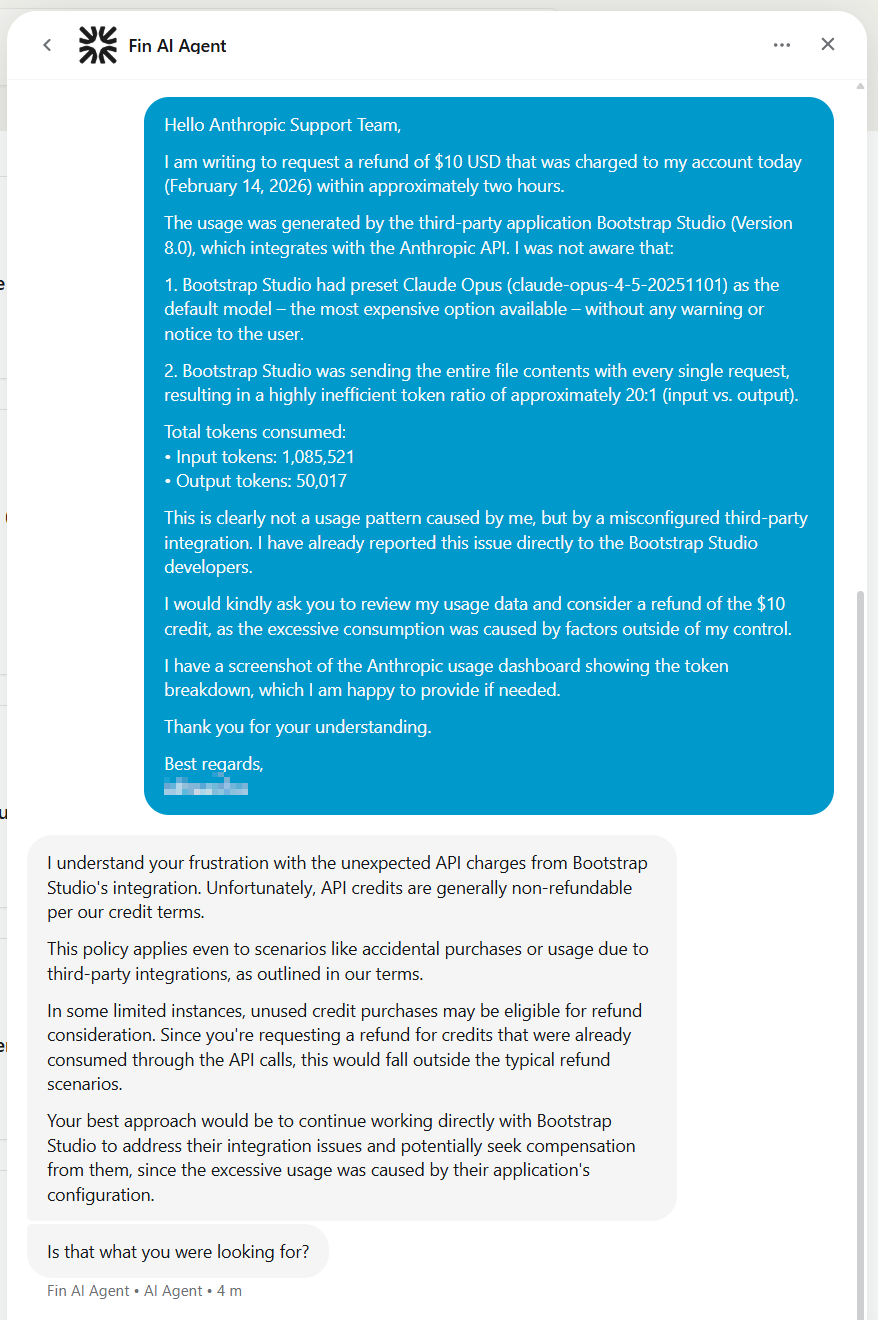
And this was there answer:

I understand your frustration with the unexpected API charges from Bootstrap Studio’s integration. Unfortunately, API credits are generally non-refundable per our credit terms.
This policy applies even to scenarios like accidental purchases or usage due to third-party integrations, as outlined in our terms.
In some limited instances, unused credit purchases may be eligible for refund consideration. Since you’re requesting a refund for credits that were already consumed through the API calls, this would fall outside the typical refund scenarios.
Your best approach would be to continue working directly with Bootstrap Studio to address their integration issues and potentially seek compensation from them, since the excessive usage was caused by their application’s configuration.

Here’s the screenshot:

To be clear:
I don’t want any money back or something else, I want that BSS works properly with any AI Tool.

1 Like

Thank you for the feedback!

With the current iteration of the assistant, you need to manage the context yourself. Models are known to deteriorate with large context, so you need to clear your conversation periodically, and be strategic with how you structure your tasks.

This is true, at the moment linked components are not preserved if the assistant overwrites them. We will make this work in our next update.

This is not true. When you enter an Anthropic key we set Haiku by default since it’s good enough in our testing. Maybe we can hide Opus and other expensive models inside a submenu so people don’t activate them by mistake.

Yes, at the moment the assistant reads the entire file. This is the most reliable way for “dumber” models to work since the Assistant needs to support AI models with varying capabilities. We will be adding an option for partial reads in our next updates that smart models can make use of.

What seemed like a good experience yesterday is now horrible, to the point that I’m going to downgrade my Bootstrap Studio to the previous version because the AI ​​in this one is practically ruining the design. In other words, the experience is awful. Luckily, I have the previous version saved on a USB drive in case this happens. God, 8.0, you’re not for me. The AI ​​is now too intelligent, and I don’t like it. I like what I can control, and what they’ve done is out of control. If I’m going to build a site like this, I’d rather just use base44. This version is the worst they’ve ever made.

For me it was set to Opus. But it doesn’t matter anymore.

This is a significant challenge.

I have a site with over 30 HTML files, and the free plan from Gemini cannot process more than 2-3 pages per day, and even the paid plans from Anthropic or Google cannot process all pages when you pay, for example, €10.

To be honest, it would have been better to test it thoroughly beforehand with large sites and then provide an indication of how much money you would need to budget for.


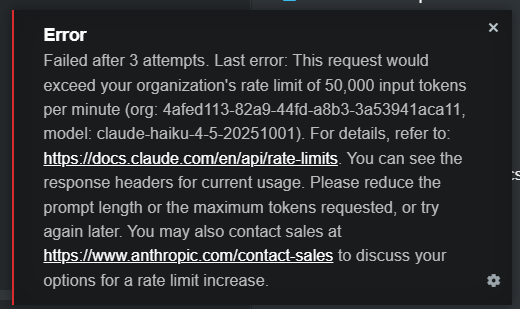
New try with Claude Haiku:

This is what I get after one site:

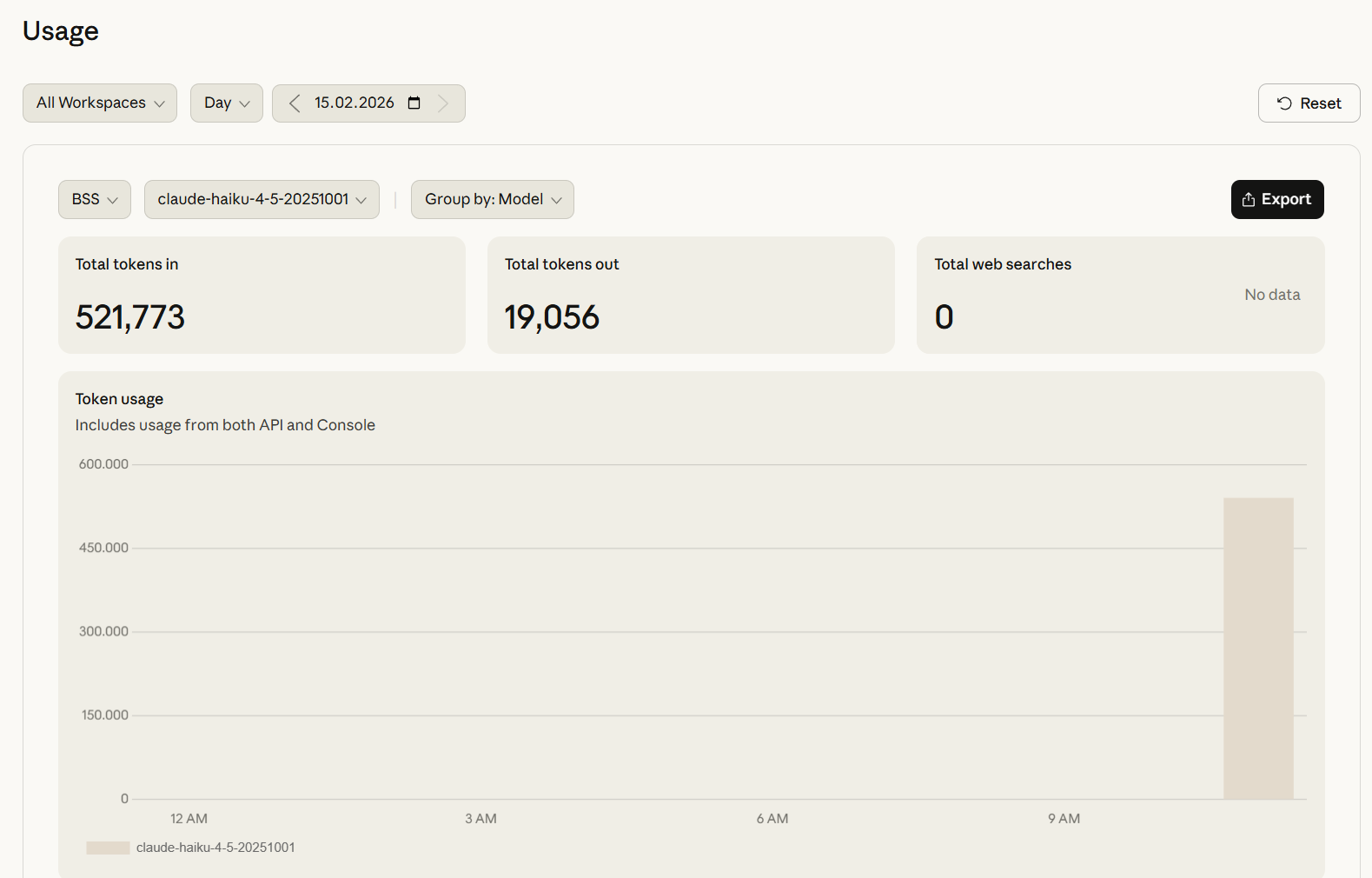
And here’s the quota with one html file. The html file is 3 colors and 3 text paragraphs, nohing more.

This is a mess!!

Update this as soon as passible!